
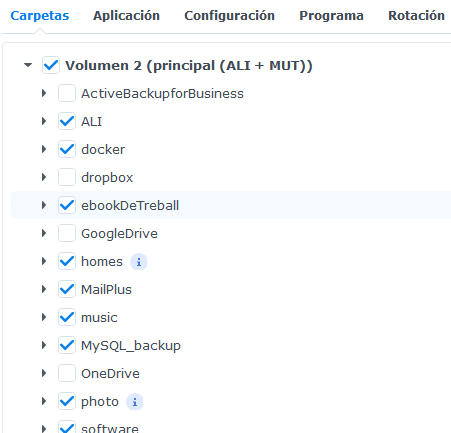

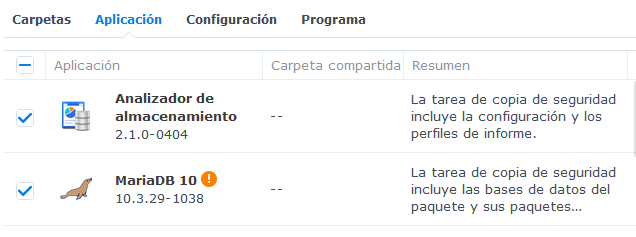
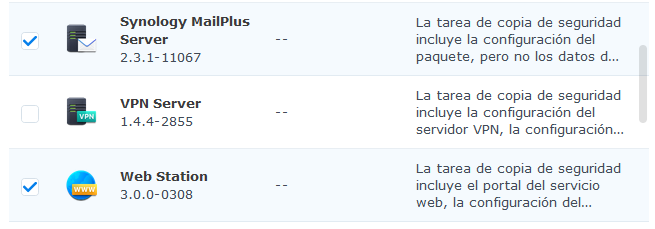
APLICACIONS
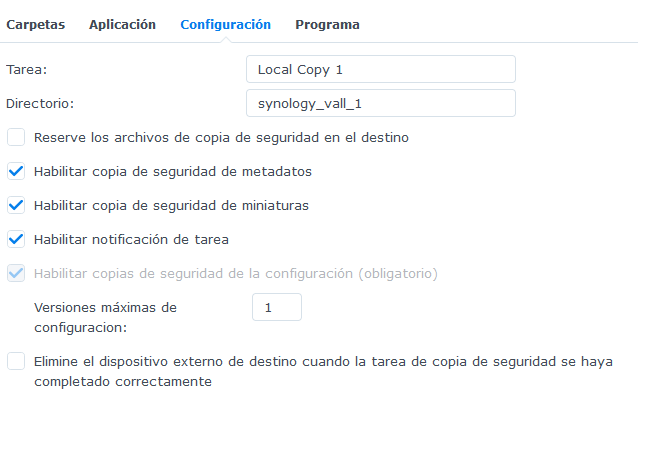
CONFIGURACIÓ
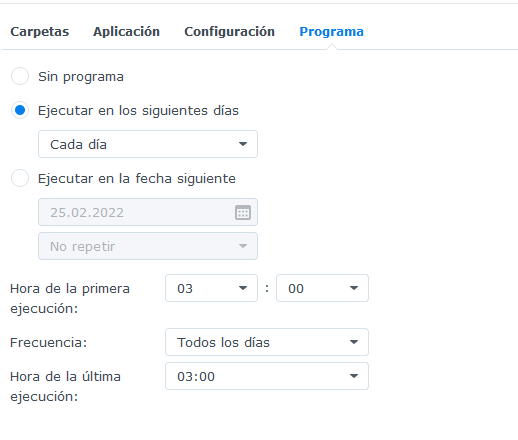
PROGRAMA
Sfdsfd
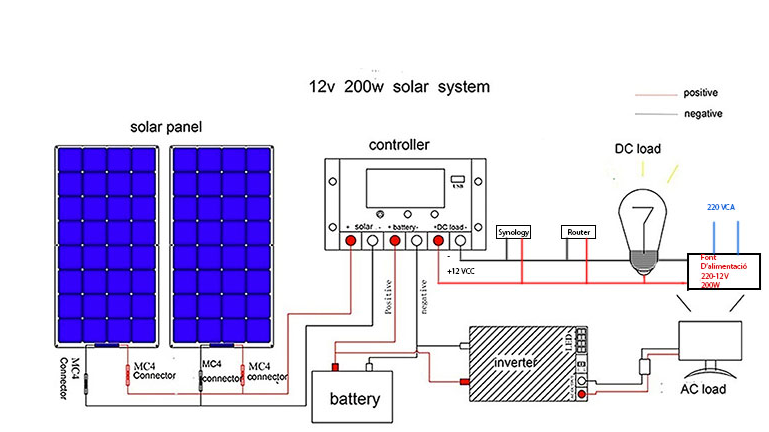
La caixa de carrega ubicada al quartet de comunicacions és:
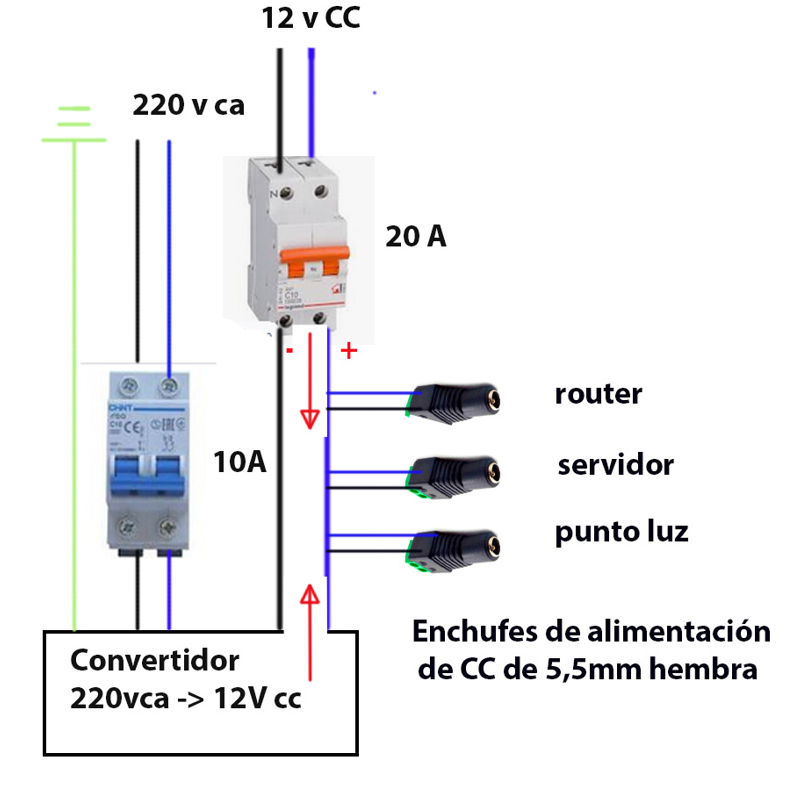
smarlife
1 ALT pinzell –> per fer un quadrat, convé posar quadricula (vista/mostrar)
——–
——–
Table of Contents
Introduction to the Structure of the Oscilloscope …. 4
Front Panel ………… 4
Rear Panel ………….. 5
Control Area ……….. 6
User Interface Introduction …………………………………… 7
How to Implement the General Inspection …………….. 8
How to Implement the Function Inspection …………… 9
How to Implement the Probe Compensation ……….. 10
How to Set the Probe Attenuation Coefficient ……… 11
How to Use the Probe Safely…………………………………. 12
How to Implement Self-calibration ……………………….. 12
Introduction to the Vertical System ……………………… 12
Introduction to the Horizontal System ………………….. 14
Introduction to the Trigger System ………………………. 14
4. Advanced User Guidebook ……..…………………………… 16
How to Set the Vertical System …………………………….. 17
Use Mathematical Manipulation Function …………….. 18
The Waveform Calculation ……………………………………. 18
Using FFT function ………………………………………………. 19
Use Vertical Position and Scale Knobs ……………………. 22
How to Set the Horizontal System …………………………… 23
Zoom the Waveform ………………………………………………. 23
How to Set the Trigger System …………………………………. 24
Single Trigger …………… 25
Alternate Trigger (Trigger mode: Edge) ……………………. 26
How to Operate the Function Menu ……………………………… 27
How to Set the Sampling/Display ………………………………. 27
How to Save and Recall a Waveform ………………………….. 28
How to Implement the Auxiliary System Function Setting … 35
How to Update your Instrument Firmware……………………. 37
How to Measure Automatically…………………………………… 38
How to Measure with Cursors …………………………………….. 42
How to Use Executive Buttons…………………………………….. 44
i
Example 1: Measurement a Simple Signal ………… 48
Example 2: Gain of a Amplifier in a Metering Circuit … 49
Example 3: Capturing a Single Signal ……………….. 50
Example 4: Analyze the Details of a Signal …………. 51
Example 5: Application of X-Y Function …………….. 53
Example 6: Video Signal Trigger ………………………… 54
General Technical Specifications ……………………….. 59
Appendix A: Enclosure ……………………………………… 60
Appendix B: General Care and Cleaning ……………. 60
ii
1.General Safety Requirements
Before use, please read the following safety precautions to avoid any possible bodily injury and to prevent this product or any other connected products from damage. In order to avoid any contingent danger, ensure this product is only used within the range specified.
Only the qualified technicians can implement the maintenance.
To avoid Fire or Personal Injury:
When powered by AC power, it is not allowed to measure AC power source directly, because the testing ground and power cord ground conductor are connected together, otherwise, it will cause short circuit.
2.Safety Terms and Symbols
Safety Terms
Terms in this manual. The following terms may appear in this manual:
 Warning: Warning indicates the conditions or practices that could result in
injury or loss of life.
 Caution: Caution indicates the conditions or practices that could result in damage to this product or other property.
Terms on the product. The following terms may appear on this product:
Danger: It indicates an injury or hazard may immediately happen.
Warning: It
indicates an injury or hazard may be accessible potentially.
Caution: It
indicates a potential damage to the instrument or other property might occur.
Safety Symbols
Symbols on the product. The following symbol may appear on the product:

 Hazardous Voltage Refer to Manual

 Protective Earth Terminal Chassis Ground
 Test Ground
2.Safety Terms and Symbols
To avoid body damage and prevent product and connected equipment damage, carefully read the following safety information before using the test tool. This product can only be used in the specified applications.
 Warning:
The two channels of the oscilloscope are not electrically isolated. The channels should adopt a common ground during measuring. To prevent short circuits, the 2 probe grounds must not be connected to 2 different non-isolated DC levels.
The diagram of the oscilloscope ground wire connection:
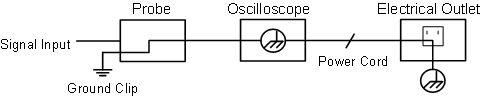
It is not allowed to measure AC power when the AC powered oscilloscope is connected to the AC-powered PC through the ports.
 Warning:
To avoid fire or electrical shock, when the oscilloscope input signal connected is more than 42V peak (30Vrms) or on circuits of more than 4800VA, please take note of below items:
This chapter makes a simple description of the operation and function of the front panel of the oscilloscope, enabling you to be familiar with the use of the oscilloscope in the shortest time.
The front panel has knobs and function buttons. The 5 buttons in the column on the right side of the display screen are menu selection buttons, through which, you can set the different options for the current menu. The other buttons are function buttons, through which, you can enter different function menus or obtain a specific function application directly.
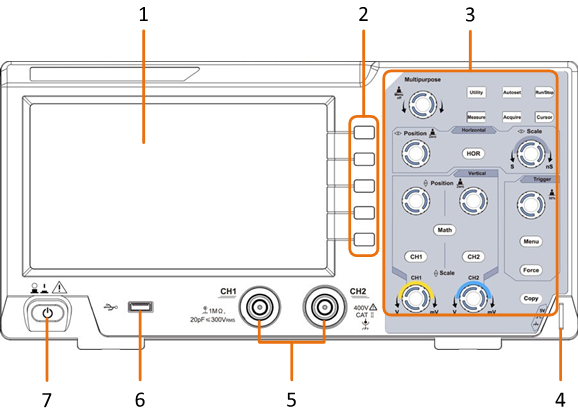
Figure 3-1 Front panel
5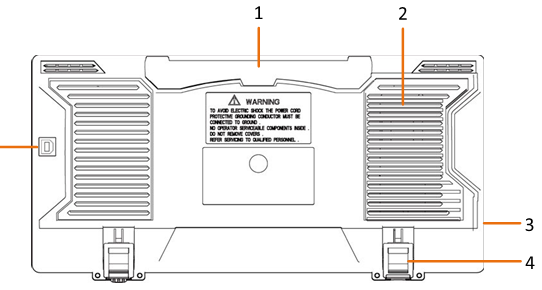
Figure 3-2 Rear Panel
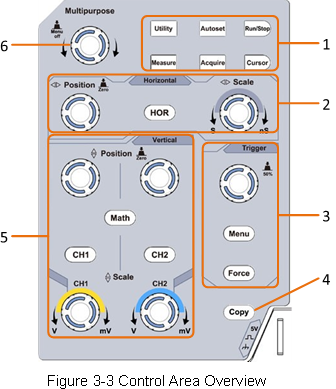
«HOR» button refer to horizontal system setting menu, «Horizontal Position» knob control trigger position, » Horizontal Scale» control time base.
The Trigger Level knob is to adjust trigger voltage. Other 2 buttons refer to trigger system setting.
«CH1» and «CH2 » correspond to setting menu in CH1 and CH2, «Math» button refer to math menu, the math menu consists of six kinds of operations, including CH1-CH2, CH2-CH1, CH1+CH2, CH1*CH2, CH1/CH2 and FFT. Two «Vertical Position» knob control the vertical position of CH1/CH2, and two «Scale» knob control voltage scale of CH1, CH2.
 symbol appears in the menu, it indicates you can turn the M knob to select the menu or set the value. You can push it to close the menu on the left and right.
 1 2 3 4 5 64 7 8
17 16 15 14 13
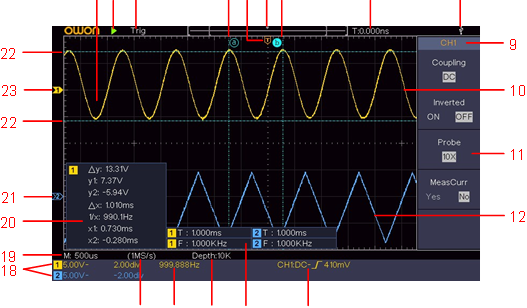
Figure 3-4 Illustrative Drawing of Display Interfaces
1. Waveform Display Area. 2. Run/Stop
Auto: Automatic mode and acquire waveform without triggering.
Trig: Trigger detected and acquire waveform.
Ready: Pre-triggered data captured and ready for a trigger.
Scan: Capture and display the waveform continuously.
Stop: Data acquisition stopped.
 Rising edge triggering
 Falling edge triggering
Video line synchronous triggering
Video field synchronous triggering
The reading shows the trigger level value of the corresponding channel.
 value, «ND» the Delay A->B
 value, «TR» the Cycle RMS, «CR» the Cursor RMS, «WP» the Screen Duty, «RP» the Phase, «+PC» the +Pulse count, «-PC» the – Pulse count, «+E» the Rise edge count, «-E» the Fall edge count, «AR» the Area, «CA» the Cycle area.
The icon shows the coupling mode of the channel.
«—» indicates direct current coupling
«~» indicates AC coupling
« » indicates GND coupling
After you get a new oscilloscope, it is recommended that you should make a check on the instrument according to the following steps:
If it is found that the packaging carton or the foamed plastic protection cushion has suffered serious damage, do not throw it away first till the complete device and its accessories succeed in the electrical and mechanical property tests.
The supplied accessories have been already described in the «Appendix A: Enclosure» of this Manual. You can check whether there is any loss of accessories with reference to this description. If it is found that there is any accessory lost or damaged, please get in touch with the distributor of OWON responsible for this service or the OWON’s local offices.
If it is found that there is damage to the appearance of the instrument, or the instrument can not work normally, or fails in the performance test, please get in touch with the OWON’s distributor responsible for this business or the OWON’s local offices. If there is damage to the instrument caused by the transportation, please keep the package. With the transportation department or the OWON’s distributor responsible for this business informed about it, a repairing or replacement of the instrument will be arranged by the OWON.
Make a fast function check to verify the normal operation of the instrument, according to the following steps:

The instrument carries out all self-check items and shows the Boot Logo. Push the Utility button, select Function in the right menu. Select Adjust in the left menu, select Default in the right menu. The default attenuation coefficient set value of the probe in the menu is 10X.
Align the slot in the probe with the plug in the CH1 connector BNC, and then tighten the probe with rotating it to the right side.
Connect the probe tip and the ground clamp to the connector of the probe compensator.
The square wave of 1 KHz frequency and 5V peak-peak value will be displayed in several seconds (see Figure 3-5).
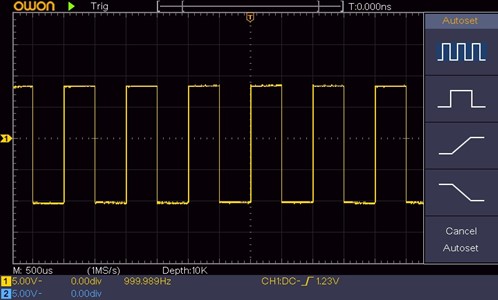
Figure 3-5 Auto set
Check CH2 by repeating Step 2 and Step 3.
When connect the probe with any input channel for the first time, make this adjustment to match the probe with the input channel. The probe which is not compensated or presents a compensation deviation will result in the measuring error or mistake. For adjusting the probe compensation, please carry out the following steps:
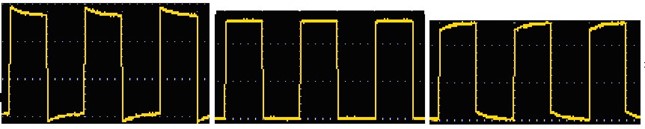
Overcompensated Compensated correctly Under compensated
Figure 3-6 Displayed Waveforms of the Probe Compensation
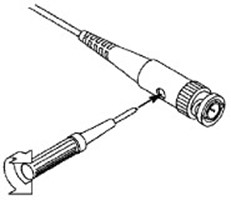
Figure 3-7 Adjust Probe
The probe has several attenuation coefficients, which will influence the vertical scale factor of the oscilloscope.
To change or check the probe attenuation coefficient in the menu of oscilloscope:
This setting will be valid all the time before it is changed again.

The default attenuation coefficient of the probe on the instrument is preset to 10X.
Make sure that the set value of the attenuation switch in the probe is the same as the menu selection of the probe attenuation coefficient in the oscilloscope.

The set values of the probe switch are 1X and 10X (see Figure 3-8).
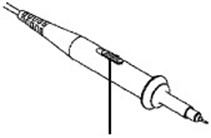
Figure 3-8 Attenuation Switch

When
the attenuation switch is set to 1X, the probe will limit the bandwidth of the oscilloscope in 5MHz. To use the full bandwidth of the oscilloscope, the switch must be set to 10X.

The safety guard ring around the probe body protects your finger against any electric shock, shown as Figure 3-9.
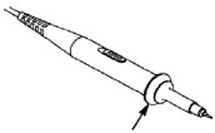
Figure 3-9 Finger Guard

To avoid electric shock, always keep your finger behind the safety guard ring of the probe during the operation.
To protect you from suffering from the electric shock, do not touch any metal part of the probe tip when it is connected to the power supply.
Before making any measurements, always connect the probe to the instrument and connect the ground terminal to the earth.

The self-calibration application can make the oscilloscope reach the optimum condition rapidly to obtain the most accurate measurement value. You can carry out this application program at any time. This program must be executed whenever the change of ambient temperature is 5℃ or over.
Before performing a self-calibration, disconnect all probes or wires from the input connector. Push the Utility button, select Function in the right menu, select Adjust. in the left menu, select Self Cal in the right menu; run the program after everything is ready.
As shown in Figure 3-10, there are a few of buttons and knobs in Vertical Controls. The following practices will gradually direct you to be familiar with the using of the vertical setting.
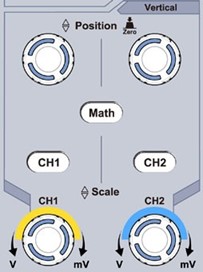
Figure 3-10 Vertical Control Zone
1. Use the Vertical Position knob to show the signal in the center of the waveform window. The Vertical Position knob functions the regulating of the vertical display position of the signal. Thus, when the Vertical Position knob is rotated, the pointer of the earth datum point of the channel is directed to move up and down following the waveform.
Measuring Skill
If the channel is under the DC coupling mode, you can rapidly measure the DC component of the signal through the observation of the difference between the wave form and the signal ground.
If the channel is under the AC mode, the DC component would be filtered out. This mode helps you display the AC component of the signal with a higher sensitivity.
Vertical offset back to 0 shortcut key
Turn the Vertical Position knob to change the vertical display position of channel and push the position knob to set the vertical display position back to 0 as a shortcut key, this is especially helpful when the trace position is far out of the screen and want it to get back to the screen center immediately.
2. Change the Vertical Setting and Observe the Consequent State Information Change.
With the information displayed in the status bar at the bottom of the waveform window, you can determine any changes in the channel vertical scale factor.
Shown as Figure 3-11, there are a button and two knobs in the Horizontal
Controls. The following practices will gradually direct you to be familiar with the setting of horizontal time base.
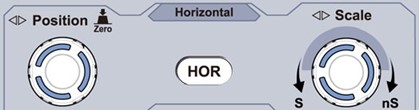
Figure 3-11 Horizontal Control Zone
Triggering displacement back to 0 shortcut key
Turn the Horizontal Position knob to change the horizontal position of channel and push the Horizontal Position knob to set the triggering displacement back to 0 as a shortcut key.
As shown in Figure 3-12, there are one knob and three buttons make up Trigger
Controls. The following practices will direct you to be familiar with the setting of the trigger system gradually.
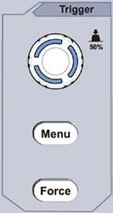
Figure 3-12 Trigger Control Zone
By turning the Trigger Level knob, the trigger indicator in the screen will move up and down. With the movement of the trigger indicator, it can be observed that the trigger level value displayed in the screen changes accordingly.
Note: Turning the Trigger Level knob can change trigger level value and it is also the hotkey to set trigger level as the vertical mid point values of the amplitude of the trigger signal.
«Normal» and «Single» trigger modes.
This chapter will deal with the following topics mainly:
It is recommended that you read this chapter carefully to get acquainted the various measurement functions and other operation methods of the oscilloscope.
The VERTICAL CONTROLS includes three menu buttons such as CH1, CH2 and Math,
and four knobs such as Vertical Position, Vertical Scale for each channel.
Setting of CH1 and CH2
Each channel has an independent vertical menu and each item is set respectively based on the channel.
Pushing the CH1, CH2, or Math buttons have the following effect:
The description of the Channel Menu is shown as the following list:
| Function Menu |
Setting | Description |
| Coupling | DC AC Ground |
Pass both AC and DC components of the input signal. Block the DC component of the input signal. Disconnect the input signal. |
| Inverted | ON OFF |
Display inverted waveform. Display original waveform. |
| Probe | 1X 10X 100X 1000X |
Match this to the probe attenuation factor to have an accurate reading of vertical scale. |
| MeasCurr | Yes No |
If you are measuring current by probing the voltage drop across a resistor, choose Yes. |
| A/V or mA/V | V/A or mV/A | Turn the M knob to set the Amps/Volts ratio. The range is 100 mA/V – 1 KA/V. Amps/Volts ratio = 1/Resistor value Volts/Amp ratio is automatically calculated. |
| Limit (only for SDS1102) | Full band 20M |
Get full bandwidth. Limit the channel bandwidth to 20MHz to reduce display noise. |
Taking the Channel 1 for example, the measured signal is a square wave signal containing the direct current bias. The operation steps are shown as below:
Waveform inverted: the displayed signal is turned 180 degrees against the phase of the earth potential.
Taking the Channel 1 for example, the operation steps are shown as follows:
For correct measurements, the attenuation coefficient settings in the operating menu of the Channel should always match what is on the probe (see «How to Set the Probe Attenuation Coefficient» on P11). If the attenuation coefficient of the probe is 1:1, the menu setting of the input channel should be set to1X.
Take the Channel 1 as an example, the attenuation coefficient of the probe is 10:1, the operation steps are shown as follows:
Take the Channel 1 as an example, if you are measuring current by probing the voltage drop across a 1Ω resistor, the operation steps are shown as follows:
The Mathematical Manipulation function is
used to show the results of the addition, multiplication, division and subtraction operations between two channels, or the FFT operation for a channel. Press the Math button to display the menu on the right.
Press the Math button to display the menu on the right, select Type as Math.
| Function Menu |
Setting |
Description |
| Type | Math | Display the Math menu |
| Factor1 | CH1 CH2 |
Select the signal source of the factor1 |
| Sign | + – * / | Select the sign of mathematical manipulation |
| Factor2 | CH1 CH2 |
Select the signal source of the factor2 |
| Next Page | Enter next page | |
| Vertical (div) |
Turn the M knob to adjust the vertical position of the Math waveform. | |
| Vertical (V/div) |
Turn the M knob to adjust the voltage division of the Math waveform. | |
| Prev Page | Enter previous page |
Taking the additive operation between Channel 1 and Channels 2 for example, the operation steps are as follows:
 symbol is in front of div, turn the M knob to adjust the vertical position of Math waveform.
 symbol is in front of the voltage, turn the M knob to adjust the voltage division of Math waveform.
The FFT (fast Fourier transform) math function mathematically converts a time-domain waveform into its frequency components. It is very useful for analyzing the input signal on Oscilloscope. You can match these frequencies with known system frequencies, such as system clocks, oscillators, or power supplies.
FFT function in this oscilloscope transforms 2048 data points of the time-domain signal into its frequency components mathematically (the record length should be 10K or above). The final frequency contains 1024 points ranging from 0Hz to Nyquist frequency.
Press the Math button to display the menu on the right, select Type as FFT.
| Function Menu |
Setting |
Description |
| Type | FFT | Display the FFT menu |
| Source | CH1 CH2 |
Select CH1 as FFT source. Select CH2 as FFT source. |
| Window | Hamming Rectangle Blackman Hanning Kaiser Bartlett |
Select window for FFT. |
| Format |
Vrms dB |
Select Vrms for Format. Select dB for Format. |
| Next Page | Enter next page | |
| Hori (Hz) | frequency frequency/div |
Switch to select the horizontal position or time base of the FFT waveform, turn the M knob to adjust it |
| Vertical | div V or dBVrms |
Switch to select the vertical position or voltage division of the FFT waveform, turn the M knob to adjust it |
| Prev Page | Enter previous page |
Taking the FFT operation for example, the operation steps are as follows:
 symbol in front of the frequency value, turn the M knob to adjust the horizontal position of FFT waveform; then press to make the
 symbol in front of the frequency/div below, turn the M knob to adjust the time base of FFT waveform.
To select the FFT window
■ There are 6 FFT windows. Each one has trade-offs between frequency resolution and magnitude accuracy. What you want to measure and your source signal characteristics help you to determine which window to use. Use the following guidelines to select the best window.
| Type | Characteristics | Window |
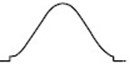
| Hamming | Better solution for magnitude than Rectangle, and good for frequency as well. It has slightly better frequency resolution than Hanning. Recommend to use for:
|
 |
| Rectangle | Best solution for frequency, worst for magnitude. Best type for measuring the frequency spectrum of nonrepetitive signals and measuring frequency components near DC. Recommend to use for:
|
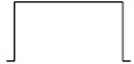 |
| Blackman | Best solution for magnitude, worst for frequency. Recommend to use for: Single frequency waveforms, to find higher order harmonics. |
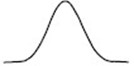 |
| Hanning | Good for magnitude, but poorer frequency resolution than Hamming. Recommend to use for:
|
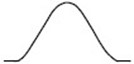 |
| Kaiser | The frequency resolution when using the Kaiser window is fair; the spectral leakage and amplitude accuracy are both good. The Kaiser window is best used when frequencies are very close to the same value but have widely differing amplitudes (the side lobe level and shape factor are closest to the traditional Gaussian RBW). This window is also good for random signals. |
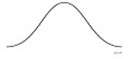 |
| Bartlett | The Bartlett window is a slightly narrower variant of the triangular window, with zero weight at both ends. | 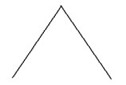 |
Notes for using FFT
What is Nyquist frequency?
The Nyquist frequency is the highest frequency that any real-time digitizing oscilloscope can acquire without aliasing. This frequency is half of the sample rate. Frequencies above the Nyquist frequency will be under sampled, which causes aliasing. So pay more attention to the relation between the frequency being sampled and measured.
The analytic resolution of this control knob changes with the vertical division.
The vertical position and vertical resolution is displayed at the left bottom corner of the screen (see Figure 4-1).
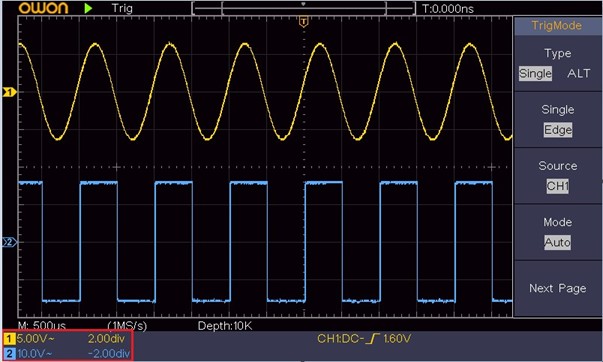
Figure 4-1 Information about Vertical Position
The HORIZONTAL CONTROLS includes the Horizontal HOR button and such knobs as Horizontal Position and Horizontal Scale.
Push the Horizontal
HOR button to enter wave zoom mode. The top half of the display shows the Main window and the bottom half displays the Zoom window. The Zoom window is a magnified portion of the Main window.
Selected portion
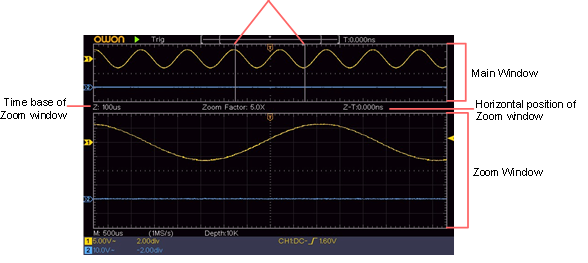
In normal mode, the Horizontal Position and Horizontal Scale knobs are used to adjust the horizontal position and time base of the Main window.
In wave zoom mode, the Horizontal Position and Horizontal Scale knobs are used to adjust the horizontal position and time base of the Zoom window.
Trigger determines when DSO starts to acquire data and display waveform. Once trigger is set correctly, it can convert the unstable display to meaningful waveform. When DSO starts to acquire data, it will collect enough data to draw waveform on left of trigger point. DSO continues to acquire data while waiting for trigger condition to occur. Once it detects a trigger it will acquire enough data continuously to draw the waveform on right of trigger point.
Trigger control area consists of 1 knob and 2 menu buttons.
Trigger Level: The knob that set the trigger level; push the knob and the level will be set as the vertical mid point values of the amplitude of the trigger signal.
Force: Force to create a trigger signal and the function is mainly used in «Normal» and «Single» mode.
Trigger Menu: The button that activates the trigger control menu.
The oscilloscope provides two trigger types: single trigger, alternate trigger. Each type of trigger has different sub menus.
Single trigger: Use a trigger level to capture stable waveforms in two channels simultaneously.
Alternate trigger: Trigger on non-synchronized signals.
The Single Trigger, Alternate Trigger menus are described respectively as follows:
Single trigger has two types: edge trigger, video trigger.
Edge Trigger: It occurs when the trigger input passes through a specified voltage level with the specified slope.
Video Trigger: Trigger on fields or lines for standard video signal.
The two trigger modes in Single Trigger are described respectively as follows:
An edge trigger occurs on trigger level value of the specified edge of input signal. Select Edge trigger mode to trigger on rising edge or falling edge.
Push the Trigger Menu button to display the Trigger
menu on the right. Select Type as Single in the right menu. Select Single as Edge in the right menu.
In Edge Trigger mode, the trigger setting information is displayed on bottom right of the
screen, for example,  indicates that trigger type is edge, trigger
source is CH1, coupling is DC, and trigger level is 0.00mV.
Edge menu list:
| Menu | Settings | Instruction |
| Type | Single | Set vertical channel trigger type as single trigger. |
| Single | Edge | Set vertical channel single trigger type as edge trigger. |
| Source | CH1 CH2 |
Channel 1 as trigger signal. Channel 2 as trigger signal. |
| Mode | Auto Normal Single |
Acquire waveform even no trigger occurs Acquire waveform when trigger occurs When trigger occurs, acquire one waveform then stop |
| Next Page | Enter next page | |
| Coupling | AC DC |
Block the direct current component. Allow all component pass. |
| Slope |  |
Trigger on rising edge Trigger on falling edge |
| Holdoff | 100 ns – 10 s, turn the M knob to set time interval before another trigger occur. | |
| Holdoff Reset |
Set Holdoff time as default value (100 ns). | |
| Prev Page | Enter previous page |
Trigger Level: trigger level indicates vertical trig position of the channel, rotate trig level knob to move trigger level, during setting, a dotted line displays to show trig position, and the value of trigger level changes at the right corner, after setting, dotted line disappears.
Choose video trigger to trigger on fields or lines of NTSC, PAL or SECAM standard video signals.
Push the Trigger Menu button to display the Trigger
menu on the right. Select Type as Single in the right menu. Select Single as Video in the right menu.
In Video Trigger mode, the trigger setting information is displayed on bottom right of the screen, for example,  indicates that trigger type is Video, trigger source is
CH1, and Sync type is Even.
Video Trigger menu list:
| MENU |
SETTING |
INSTRUCTION |
| Type | Single | Set vertical channel trigger type as single trigger. |
| Single | Video | Set vertical channel single trigger type as video trigger. |
| Source | CH1 CH2 |
Select CH1 as the trigger source Select CH2 as the trigger source |
| Modu | NTSC PAL SECAM |
Select video modulation |
| Next Page | Enter next page | |
| Sync | Line Field Odd Even Line NO. |
Synchronic trigger in video line Synchronic trigger in video field Synchronic trigger in video odd filed Synchronic trigger in video even field Synchronic trigger in designed video line. Press Line NO. menu item, turn the M knob to set the line number. |
| Prev Page |
|
Enter previous page |
Trigger signal comes from two vertical channels when alternate trigger is on. This mode is used to observe two unrelated signals. Trigger mode is edge trigger.
Alternate trigger (Trigger Type: Edge)
menu list:
| Menu | Settings | Instruction |
| Type | ALT | Set vertical channel trigger type as alternate trigger. |
| Source | CH1 CH2 |
Channel 1 as trigger signal. Channel 2 as trigger signal. |
| Next Page | Enter next page | |
| Coupling | AC DC |
Block the direct current component. Allow all component pass. |
| Slope | 
|
Trigger on rising edge Trigger on falling edge |
| Holdoff | 100 ns – 10 s, turn the M knob to set time interval before another trigger occur. | |
| Holdoff Reset |
Set Holdoff time as default value (100 ns). | |
| Prev Page |
|
Enter previous page |
The function menu control zone includes 4 function menu buttons: Utility, Measure, Acquire, Cursor, and 2 immediate-execution buttons: Autoset, Run/Stop.
Push the Acquire button, the Sampling and Display menu is shown in the right as follows:
| Function Menu | Setting | Description |
| Acqu Mode | Sample Peak Detect |
Average
Normal sampling mode.
Use to capture maximal and minimal samples. Finding highest and lowest points over adjacent intervals. It is used for the detection of the jamming burr and the possibility of reducing the confusion.
It is used to reduce the random and don’t-care noises, with the optional number of averages. Turn the M knob to select 4, 16, 64, 128 in the left menu.
Type
Dots
Vect
Only the sampling points are displayed.
The space between the adjacent sampling points in the display is filled with the vector form.
Persist
OFF
5 Seconds
Infinity
Set the persistence time
XY Mode
ON
OFF
Turn on/off XY display function
Counter
ON
OFF
Turn on/off counter
When the Persist function is used, the persistence display effect of the picture tube oscilloscope can be simulated. The reserved original data is displayed in fade color and the new data is in bright color.
This format is only applicable to Channel 1 and Channel 2. After the XY display format is selected, Channel 1 is displayed in the horizontal axis and Channel 2 in the vertical axis; the oscilloscope is set in the un-triggered sample mode: the data are displayed as bright spots.
The operations of all control knobs are as follows:
The following functions can not work in the XY Format:
Operation steps:
It is a 6-digit single-channel counter. The counter can only measure the frequency of the triggering channel. The frequency range is from 2Hz to the full bandwidth. Only if the measured channel is in Edge mode of Single trigger type, the counter can be enabled. The counter is displayed at the bottom of the screen.

Operation steps:
Push the Utility button, select Function in the right menu, select Save in the left menu.
By selecting Type in the right menu, you can save the waveforms, configures or screen images.
When the Type is selected as Wave, the menu is shown as the following table:
| Function Menu | Setting | Description |
| Function | Save | Display the save function menu |
| Type | Wave | Choose the saving type as wave. |
| Source |
CH1 CH2 Math All |
Choose the waveform to be saved. (Choose All to save all the waveforms that are turned on. You can save into the current internal object address, or into USB storage as a single file.) |
| Object |
ON OFF |
The object 0 – 15 are listed in the left menu, turn the M knob to choose the object which the waveform is saved to or recall from. Recall or close the waveform stored in the current object address. When the show is ON, if the current object address has been used, the stored waveform will be shown, the address number and relevant information will be displayed at the top left of the screen; if the address is empty, it will prompt «None is saved». |
| Next Page | Enter next page | |
| Close All | Close all the waveforms stored in the object address. | |
| File Format | BIN TXT CSV |
For internal storage, only BIN can be selected. For external storage, the format can be BIN, TXT or CSV. |
| Save | Save the waveform of the source to the selected address. | |
| Storage | Internal External | Save to internal storage or USB storage. When External is selected, the file name is editable. The BIN waveform file could be open by OWON waveform analysis software (on the supplied CD). |
| Prev Page | Enter previous page |
When the Type is selected as Configure, the menu is shown as the following table:
| Function Menu | Setting | Description |
| Function | Save | Display the save function menu |
| Type | Configure | Choose the saving type as configure. |
| Configure | Setting1 ….. Setting8 |
The setting address |
| Save | Save the current oscilloscope configure to the internal storage | |
| Load | Recall the configure from the selected address |
When the Type is selected as Image, the menu is shown as the following table:
| Function Menu | Setting | Description |
| Function | Save | Display the save function menu |
| Type | Image | Choose the saving type as image. |
| Save | Save the current display screen. The file can be only stored in a USB storage, so a USB storage must be connected first. The file name is editable. The file is stored in BMP format. |
The oscilloscope can store 16 waveforms, which can be displayed with the current waveform at the same time. The stored waveform called out can not be adjusted.
In order to save the waveform of CH1, CH2 and Math into the address 1, the operation steps should be followed:
In order to save the waveform of CH1 and CH2 into the USB storage as a BIN file, the operation steps should be followed:
 key in the keyboard to confirm.
Shortcut for Save
function:
The Copy button on the bottom right of the front panel is the shortcut for Save function in the Utility function menu. Pressing this button is equal to the Save option in the Save menu. The waveform, configure or the display screen could be saved according to the chosen type in the Save menu.
Save the current screen image:
The screen image can only be stored in USB disk, so you should connect a USB disk with the instrument.
 appears on the top right of the screen, the USB disk is installed successfully. If the USB disk cannot be recognized, format the USB disk according to the methods in «USB disk Requirements» on P31.
 key in the keyboard to confirm.
The supported format of the USB disk: FAT32 file system, the allocation unit size cannot exceed 4K, mass storage USB disk is also supported. If the USB disk doesn’t work properly, format it into the supported format and try again. Follow any of the following two methods to format the USB disk: using system-provided function and using the formatting tools. (The USB disk of 8 G or 8 G above can only be formatted using the second method – using the formatting tools.)
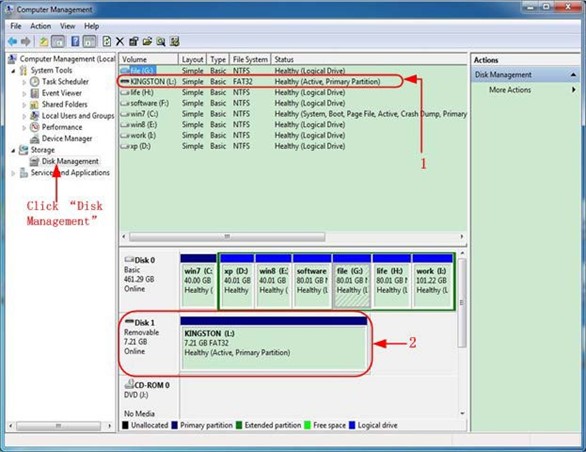
Figure 4-2: Disk Management of computer
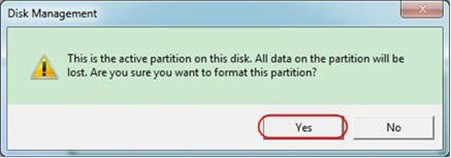
Figure 4-3: Format the USB disk warning
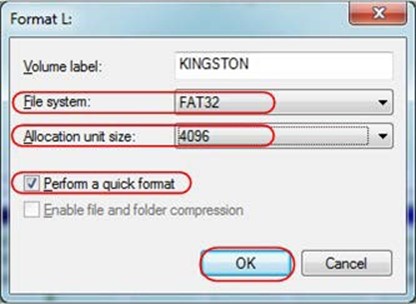
Figure 4-4: Formatting the USB disk setting 6. Formatting process.
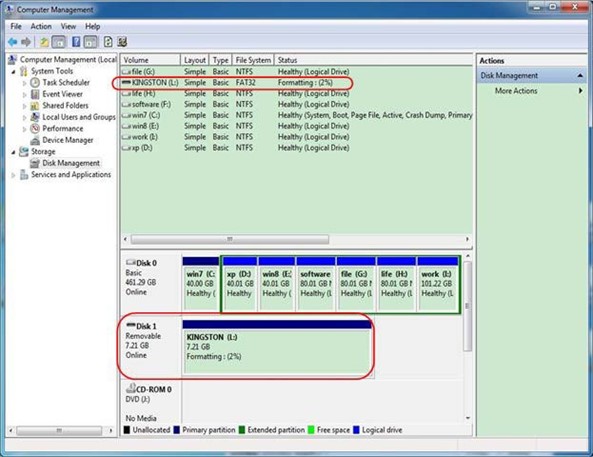
Figure 4-5: Formatting the USB disk
7. Check whether the USB disk is FAT32 with allocation unit size 4096 after formatting.
Download URL:
http://www.partitionwizard.com/free-partition-manager.html
Tip: There are many tools for the USB disk formatting on the market, just take Minitool Partition Wizard for example here.
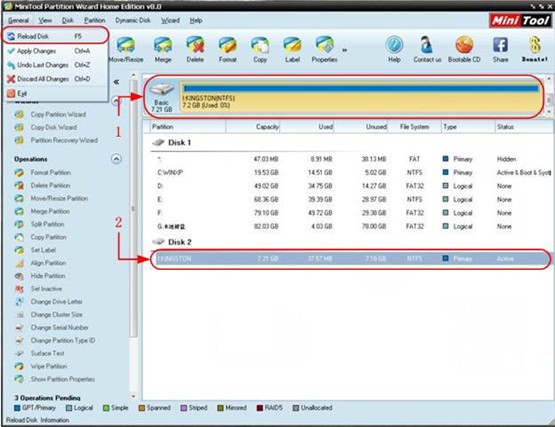
Figure 4-6: Reload Disk 4. Right click 1 or 2 red mark area, choose Format.
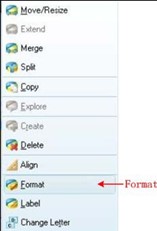
Figure 4-7: Choose format 5. Set File System FAT32, Cluster size 4096. Click OK.
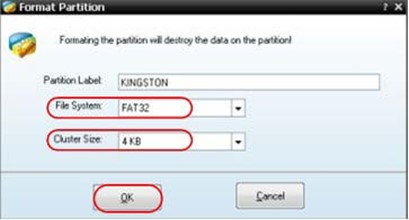
Figure 4-8: Format setting
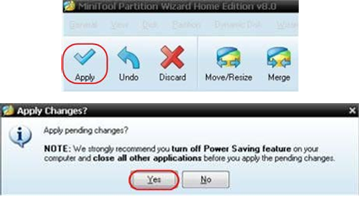
Figure 4-9: Apply setting
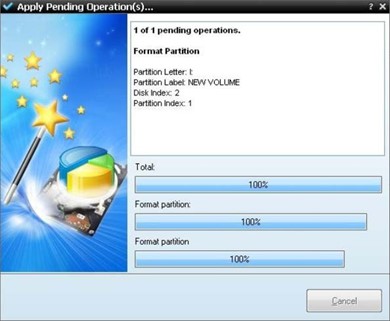
Figure 4-10: Format process
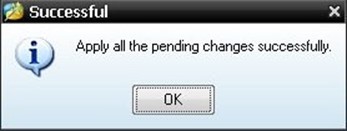
Figure 4-11: Format successfully
Push the Utility button, select Function in the right menu, select Configure in the left menu.
The description of Configure Menu is shown as the follows:
|
Function Menu |
Setting |
Description |
|
Function |
Configure |
Show the configure menu |
|
KeyLock |
|
Lock all keys. Unlock method: push Trigger Menu button in trigger control area, then push Force button, repeat |
|
About |
|
Show the version and serial number |
Push the Utility button, select Function in the right menu, select Display in the left menu.
The description of Display
Menu is shown as the follows:
|
Function Menu |
Setting |
Description |
| Function | Display | Show the display menu |
| BackLight | 0% – 100% | Turn the M knob to adjust the backlight. |
| Graticule | 
|
Select the grid type |
| Menu Time |
OFF, 5S – 30S |
Turn the M knob to set the disappear time of menu |
Push the Utility button, select Function in the right menu, select Adjust in the left menu.
The description of Adjust
Menu is shown as the follows:
| Function Menu |
Description |
| Self Cal | Carry out the self-calibration procedure. |
| Default | Call out the factory settings. |
| ProbeCh. | Check whether probe attenuation is good. |
Do Self Cal (Self-Calibration)
The self-calibration procedure can improve the accuracy of the oscilloscope under the ambient temperature to the greatest extent. If the change of the ambient temperature is up to or exceeds 5℃, the self-calibration procedure should be executed to obtain the highest level of accuracy.
Before executing the self-calibration procedure, disconnect all probes or wires from the input connector. Push the Utility button, select Function in the right menu, the function menu will display at the left, select Adjust. If everything is ready, select Self Cal in the right menu to enter the self-calibration procedure of the instrument.
Probe checking
To check whether probe attenuation is good. The results contain three circumstances: Overflow compensation, Good compensation, Inadequate compensation. According to the checking result, users can adjust probe attenuation to the best. Operation steps are as follows:
You can save the waveforms, configures or screen images. Refer to «How to Save and Recall a Waveform» on page 28.
Use the front-panel USB port to update your instrument firmware using a USB memory device. Refer to «How to Update your Instrument Firmware» on page 37.
Use the front-panel USB port to update your instrument firmware using a USB memory device.
USB memory device requirements: Insert a USB memory device into the USB port on the front panel. If the icon  appears on the top right of the screen, the USB memory
device is installed successfully. If the USB memory device cannot be detected, format the USB memory device according to the methods in «USB disk Requirements» on P31.
Caution: Updating your instrument firmware is a sensitive operation, to prevent damage to the instrument, do not power off the instrument or remove the USB memory device during the update process.
To update your instrument firmware, do the following:
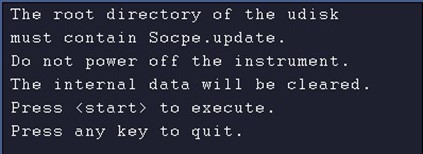
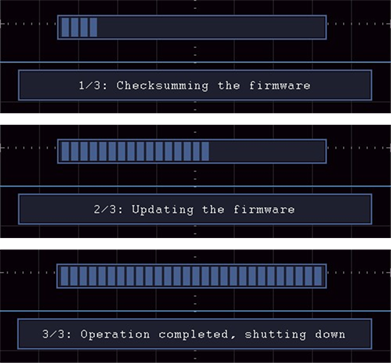

Push the Measure button to display the menu for the settings of the Automatic Measurements. At most 8 types of measurements could be displayed on the bottom left of the screen.
The oscilloscopes provide 30 parameters for auto measurement, including Period,
Frequency, Mean, PK-PK, RMS, Max, Min, Top, Base, Amplitude, Overshoot, Preshoot,
Rise Time, Fall Time, +PulseWidth, -PulseWidth, +Duty Cycle, -Duty Cycle, Delay A→B , Delay A→B
 , Cycle RMS, Cursor RMS, Screen Duty, Phase, +PulseCount, -PulseCount, RiseEdgeCnt, FallEdgeCnt, Area, and Cycle Area.
The «Automatic Measurements» menu is described as the following table:
|
Function Menu |
Setting | Description |
| AddCH1 | Meas Type (left menu) |
Press to show the left menu, turn the M knob to select the measure type, press AddCH1 again to add the selected measure type of CH1. |
| AddCH2 | Meas Type (left menu) |
Press to show the left menu, turn the M knob to select the measure type, press AddCH2 again to add the selected measure type of CH2. |
| Show | OFF CH1 CH2 |
Hide the window of measures Show all the measures of CH1 on the screen Show all the measures of CH2 on the screen |
| Remove | Meas Type (left menu) |
Press to show the left menu, turn the M knob to select the type need to be deleted, press Remove again to remove the selected measure type. |
| Remove All | Remove all the measures |
Only if the waveform channel is in the ON state, the measurement can be performed. The automatic measurement can not be performed in the following situation: 1) On the saved waveform. 2) On the Dual Wfm Math waveform. 3) On the Video trigger mode.
On the Scan format, period and frequency can not be measured.
Measure the period, the frequency of the CH1, following the steps below:
The measured value will be displayed at the bottom left of the screen automatically (see Figure 4-12).
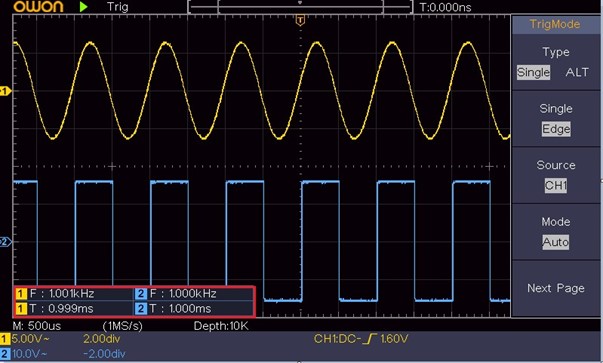
Figure 4-12 Automatic measurement
The oscilloscopes provide automatic voltage measurements including Mean, PK-PK, RMS, Max, Min, Vtop, Vbase, Vamp, OverShoot, PreShoot, Cycle RMS, and Cursor
RMS. Figure 4-13 below shows a pulse with some of the voltage measurement points.
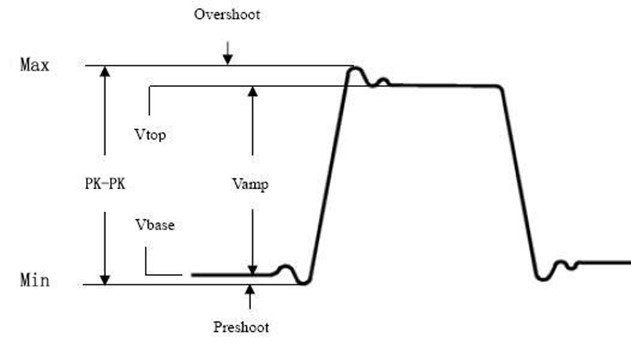
Figure 4-13
Mean: The arithmetic mean over the entire waveform.
PK-PK: Peak-to-Peak Voltage.
RMS: The true Root Mean Square voltage over the entire waveform.
Max: The maximum amplitude. The most positive peak voltage measured over the entire waveform.
Min: The minimum amplitude. The most negative peak voltage measured over the entire waveform.
Vtop: Voltage of the waveform’s flat top, useful for square/pulse waveforms.
Vbase: Voltage of the waveform’s flat base, useful for square/pulse waveforms.
Vamp: Voltage between Vtop and Vbase of a waveform.
OverShoot: Defined as (Vmax-Vtop)/Vamp, useful for square and pulse waveforms.
PreShoot: Defined as (Vmin-Vbase)/Vamp, useful for square and pulse waveforms.
Cycle RMS: The true Root Mean Square voltage over the first entire period of the waveform.
Cursor RMS: The true Root Mean Square voltage over the range of two cursors.
The oscilloscopes provide time parameters auto-measurements include Period, Frequency, Rise Time, Fall Time, +D width, -D width, +Duty, -Duty, Delay A→B , Delay A→B
 , and Duty cycle.
Figure 4-14 shows a pulse with some of the time measurement points.
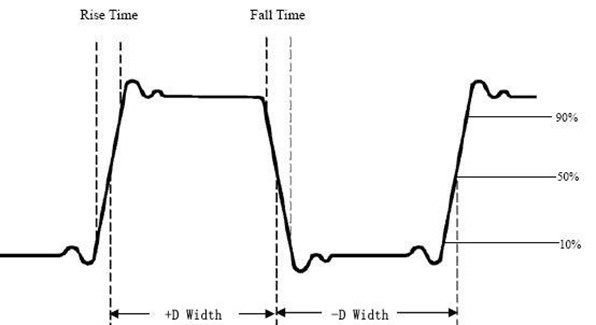
Figure 4-14
Rise Time: Time that the leading edge of the first pulse in the waveform takes to rise from 10% to 90% of its amplitude.
Fall Time: Time that the falling edge of the first pulse in the waveform takes to fall from 90% to 10% of its amplitude.
+D width: The width of the first positive pulse in 50% amplitude points.
-D width: The width of the first negative pulse in the 50% amplitude points.
+Duty: +Duty Cycle, defined as +Width/Period.
-Duty:-Duty Cycle, defined as -Width/Period.
Delay A→B : The delay between the two channels at the rising edge.
Delay A→B : The delay between the two channels at the falling edge.
Screen Duty: Defines as (the width of the positive pulse)/(Entire period)
Phase: Compare the rising edge of CH1 and CH2, calculate phase difference of two channels.
Phase difference=(Delay between channels at the rising edge÷Period)×360°.
+PulseCount  : The number of positive pulses that rise above the mid reference crossing in the waveform.
-PulseCount  : The number of negative pulses that fall below the mid reference crossing in the waveform.
RiseEdgeCnt  : The number of positive transitions from the low reference value to the high reference value in the waveform.
FallEdgeCnt  : The number of negative transitions from the high reference value to the low reference value in the waveform.
Area : The area of the whole waveform within the screen and the unit is voltage-second. The area measured above the zero reference (namely the vertical offset) is positive; the area measured below the zero reference is negative. The area measured is the algebraic sum of the area of the whole waveform within the screen.
Cycle Area : The area of the first period of waveform on the screen and the unit is voltage-second. The area above the zero reference (namely the vertical offset) is positive and the area below the zero reference is negative. The area measured is the algebraic sum of the area of the whole period waveform.
Note: When the waveform on the screen is less than a period, the period area measured is 0.
Push the Cursor button to turn cursors on and display the cursor menu. Push it again to turn cursors off.
The Cursor Measurement for normal mode:
The description of the cursor menu is shown as the following table:
|
Function Menu |
Setting | Description |
| Type | Voltage Time Time&Voltage AutoCursr |
Display the voltage measurement cursor and menu. Display the time measurement cursor and menu. Display the time and voltage measurement cursor and menu. The horizontal cursors are set as the intersections of the vertical cursors and the waveform |
|
Line Type (Time&Vol tage type) |
Time Voltage |
Makes the vertical cursors active. Makes the horizontal cursors active. |
|
Window (Wave zoom mode) |
Main Extension | Measure in the main window. Measure in the extension window. |
| Line | a b ab |
Turn the M knob to move line a. Turn the M knob to move line b. Two cursors are linked. Turn the M knob to move the pair of cursors. |
| Source | CH1 CH2 |
Display the channel to which the cursor measurement will be applied. |
Perform the following operation steps for the time and voltage cursor measurement of the channel CH1:
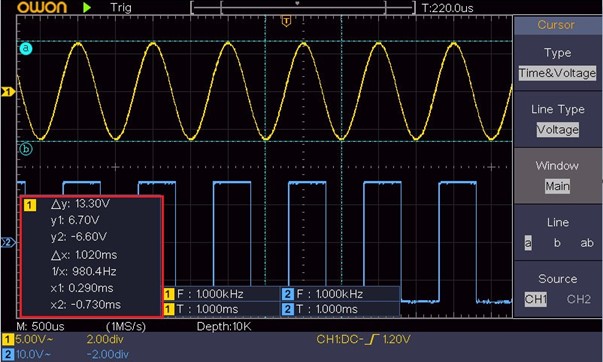
Figure 4-15 Time&Voltage Cursor Measurement
For the AutoCursr type, the horizontal cursors are set as the intersections of the vertical cursors and the waveform.
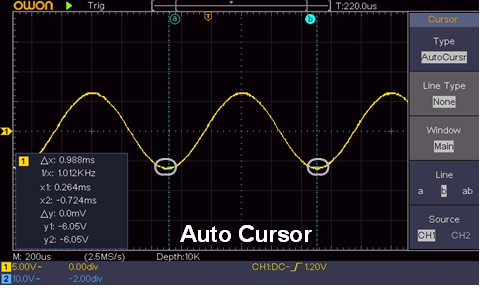
In FFT mode, push the Cursor button to turn cursors on and display the cursor menu.
The description of the cursor menu in FFT mode is shown as the following table:
| Function Menu |
Setting | Description |
| Type | Vamp Freq Freq&Vamp AutoCursr |
Display the Vamp measurement cursor and menu. Display the Freq measurement cursor and menu. Display the Freq and Vamp measurement cursor and menu. The horizontal cursors are set as the intersections of the vertical cursors and the waveform |
|
Line Type (Freq&Vamp type) |
Freq Vamp |
Makes the vertical cursors active. Makes the horizontal cursors active. |
| Window (Wave zoom mode) |
Main Extension | Measure in the main window. Measure in the FFT extension window. |
| Line | a b ab |
Turn the M knob to move line a. Turn the M knob to move line b. Two cursors are linked. Turn the M knob to move the pair of cursors. |
| Source | Math FFT | Display the channel to which the cursor measurement will be applied. |
Perform the following operation steps for the amplitude and frequency cursor measurement of math FFT:
Executive Buttons include Autoset, Run/Stop, Copy.
It’s a very useful and quick way to apply a set of pre-set functions to the incoming signal, and display the best possible viewing waveform of the signal and also works out some measurements for user as well.
The details of functions applied to the signal when using Autoset are shown as the following table:
| Function Items | Setting |
| Vertical Coupling |
Current |
| Channel Coupling | Current |
| Vertical Scale | Adjust to the proper division. |
| Horizontal Level | Middle or ±2 div |
| Horizontal Sale | Adjust to the proper division |
| Trigger Type | Slope or Video |
| Trigger Source | CH1 or CH2 |
| Trigger Coupling | DC |
| Trigger Slope | Current |
| Trigger Level | 3/5 of the waveform |
| Trigger Mode | Auto |
| Display Format | YT |
| Force | Stop |
| Inverted | Off |
| Zoom Mode | Exit |
Five kinds of types: Sine, Square, video signal, DC level, Unknown signal.
Menu as follow:
| Waveform | Menu |
| Sine |
Multi-period, Single-period, FFT, Cancel Autoset |
| Square |
Multi-period, Single-period, Rising Edge, Falling Edge, Cancel Autoset |
| Video signal | Type (line, field), Odd, Even, Line NO., Cancel Autoset |
| DC level/Unknown signal |
Cancel Autoset |
Description for some icons:
Multi-period To display multiple periods
Single-period To display single period
FFT Switch to FFT mode
Rising Edge Display the rising edge of square waveform
Falling Edge Display the falling edge of square waveform
Cancel Autoset Go back to display the upper menu and waveform information
Note: The Autoset
function requires that the frequency of signal should be no lower
than 20Hz, and the amplitude should be no less than 5mv. Otherwise, the Autoset function may be invalid.
Enable or disable sampling on input signals.
Notice: When there is no sampling at STOP state, the vertical division and the horizontal time base of the waveform still can be adjusted within a certain range, in other words, the signal can be expanded in the horizontal or vertical direction. When the horizontal time base is 50ms, the horizontal time base can be expanded for 4 divisions downwards.
This button is the shortcut for Save function in the Utility function menu. Pressing this button is equal to the Save option in the Save menu. The waveform, configure or the display screen could be saved according to the chosen type in the Save menu. For more details, please see «How to Save and Recall a Waveform» on P28.
5.Communication with PC
The oscilloscope supports communications with a PC through USB. You can use the Oscilloscope communication software to store, analyze, display the data and remote control.
To learn about how to operate the software, you can push F1 in the software to open the help document.
Here is how to connect with PC via USB port.
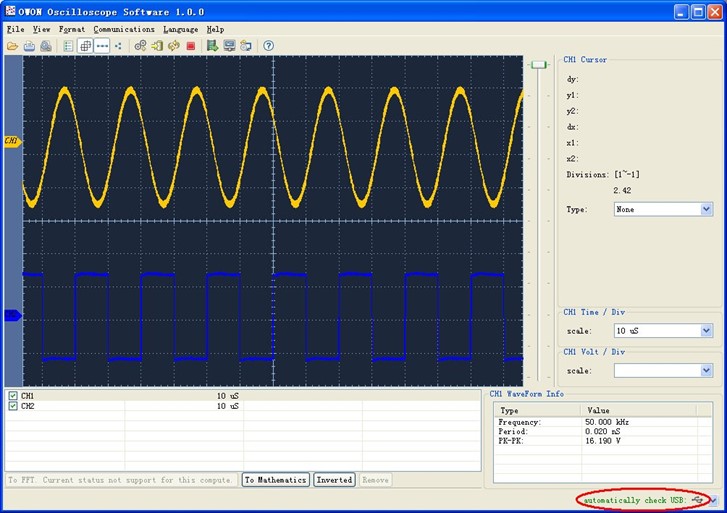
Figure 5-1 Connect with PC through USB port
The purpose of this example is to display an unknown signal in the circuit, and measure the frequency and peak-to-peak voltage of the signal.
1. Carry out the following operation steps for the rapid display of this signal:
The oscilloscope will implement the Autoset to make the waveform optimized, based on which, you can further regulate the vertical and horizontal divisions till the waveform meets your requirement.
2. Perform Automatic Measurement
The oscilloscope can measure most of the displayed signals automatically. To measure the period, the frequency of the CH1, following the steps below:
The measured value will be displayed at the bottom left of the screen automatically (see Figure 6-1).
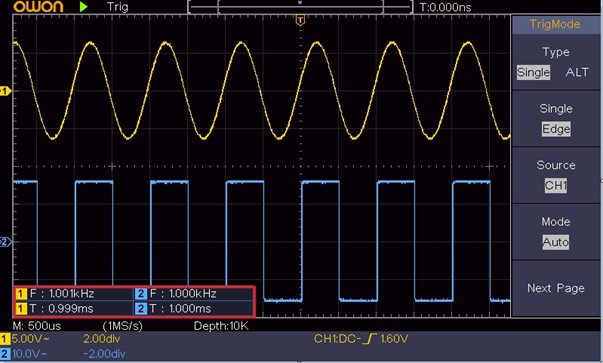
Figure 6-1 Measure period and frequency value for a given signal
The purpose of this example is to work out the Gain of an Amplifier in a Metering Circuit. First we use Oscilloscope to measure the amplitude of input signal and output signal from the circuit, then to work out the Gain by using given formulas.
Set the probe menu attenuation coefficient as 10X and that of the switch in the probe as 10X (see «How to Set the Probe Attenuation Coefficient» on P11).
Connect the oscilloscope CH1 channel with the circuit signal input end and the CH2 channel to the output end.
Operation Steps:
Gain = Output Signal / Input signal
Gain (db) = 20×log (gain)
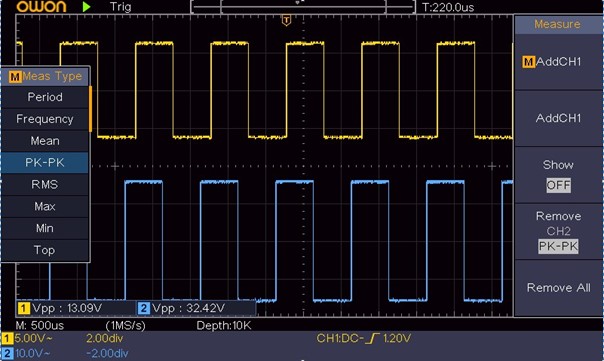
Figure 6-2 Waveform of Gain Measurement
It’s quite easy to use Digital Oscilloscope to capture non-periodic signal, such as a pulse and burr etc. But the common problem is how to set up a trigger if you have no knowledge of the signal? For example, if the pulse is the logic signal of a TTL level, the trigger level should be set to 2 volts and the trigger edge be set as the rising edge trigger. With various functions supported by our Oscilloscope, user can solve this problem by taking an easy approach. First to run your test using auto trigger to find out the closest trigger level and trigger type, this helps user to make few small adjustments to achieve a proper trigger level and mode. Here is how we achieve this.
The operation steps are as follows:
 (rising).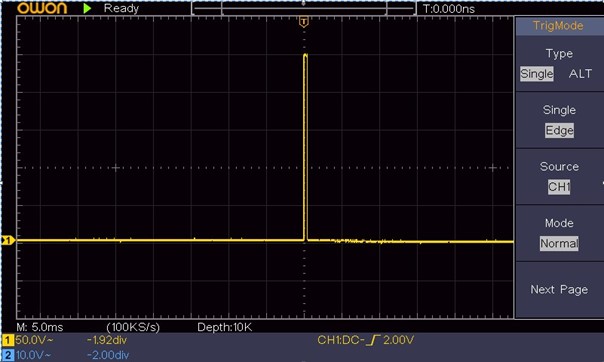
Figure 6-3 Capturing a Single Signal
Noise is very common inside most of the electronic signal. To find out what’s inside the noise and reduce the level of noise is very important function our oscilloscope is capable to offer.
Noise Analysis
The level of noise sometime indicates a failure of electronic circuit. The Peak Detect functions acts an important role to help you to find out the details of these noise. Here is how we do it:
The signal displayed on the screen containing some noise, by turning on Peak Detect function and changing time base to slow down the incoming signal, any peaks or burr would be detected by the function (see Figure 6-4).
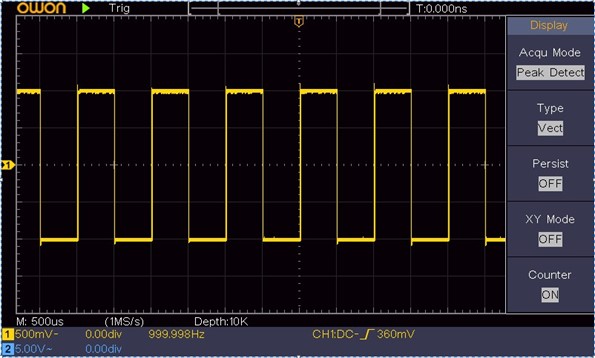
Figure 6-4 Signal with Noises
Separate Noises from the Signal
When focusing on signal itself, the important thing is to reduce the noise level as lower as possible, this would enable user to have more details about the signal. The Average function offered by our Oscilloscope can help you to achieve this.
Here are the steps for how to enable Average function.
User would see a much reduced random noise level and make it easy to see more details of the signal itself. After applying Average, user can easily identify the burrs on the rising and falling edges of some part of the signal (see Figure 6-5).
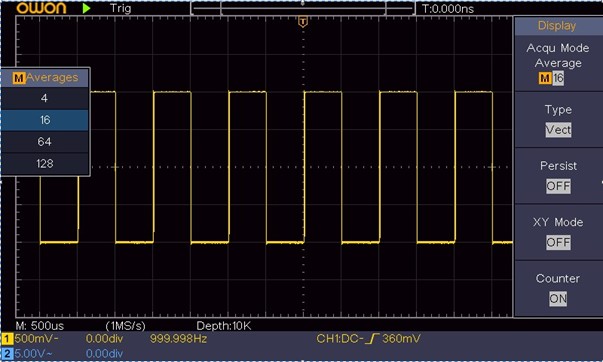
Figure 6-5 Reduce Noise level by using Average function
Examine the Phase Difference between Signals of two Channels
Example: Test the phase change of the signal after it passes through a circuit network.
X-Y mode is a very useful when examining the Phase shift of two related signals. This example takes you step by step to check out the phase change of the signal after it passes a specified circuit. Input signal to the circuit and output signal from circuit are used as source signals.
For the examination of the input and output of the circuit in the form of X-Y coordinate graph, please operate according to the following steps:
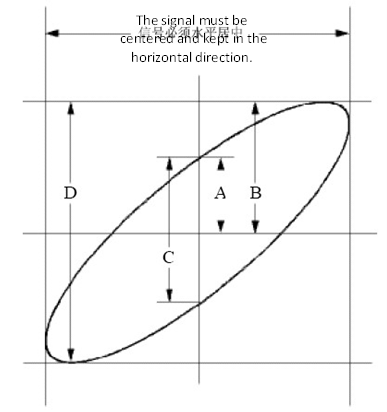
Figure 6-6 Lissajous Graph
Based on the expression sin (q) =A/B or C/D, thereinto, q is the phase difference angle, and the definitions of A, B, C, and D are shown as the graph above. As a result, the phase difference angle can be obtained, namely, q =± arcsin (A/B) or ± arcsin (C/D). If the principal axis of the ellipse is in the I and III quadrants, the determined phase difference angel should be in the I and IV quadrants, that is, in the range of (0 – π /2) or (3π / 2 – 2π). If the principal axis of the ellipse is in the II and IV quadrants, the determined phase difference angle is in the II and III quadrants, that is, within the range of (π / 2 – π) or (π – 3π /2).
Observe the video circuit of a television, apply the video trigger and obtain the stable video output signal display.
Video Field Trigger
For the trigger in the video field, carry out operations according to the following steps:
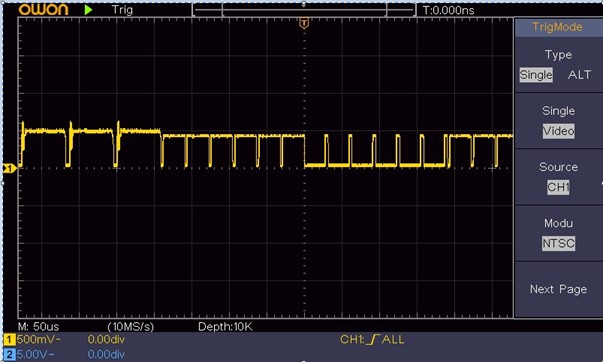
Figure 6-7 Waveform Captured from Video Field Trigger
7.Troubleshooting
Look at the attenuation coefficient for the input channel and the attenuation ration of the probe, to make sure they are match
(see «How to Set the Probe Attenuation Coefficient» on P11).
Check whether Normal or Signal is chosen for Polarity in the TRIG MODE menu and the trigger level exceeds the waveform range.
If it is, make the trigger level is centered in the screen or set the trigger mode as Auto. In addition, with the Autoset button pressed, the setting above can be completed automatically.
It’s normal as the Oscilloscope is working hard on many more data points.
Unless otherwise specified, the technical specifications applied are for the oscilloscope only, and Probes attenuation set as 10X. Only if the oscilloscope fulfills the following two conditions at first, these specification standards can be reached.
All specification standards can be fulfilled, except one(s) marked with the word «Typical».
| Performance Characteristics |
Instruction |
||||||||
| Bandwidth | SDS1022 | 20 MHz | |||||||
| SDS1102 | 100 MHz | ||||||||
| Channel | 2 channels | ||||||||
| Acquisition | Mode | Normal, Peak detect, Averaging | |||||||
| Sample rate (real time) |
100 MS/s | ||||||||
| Input |
Input coupling | DC, AC , Ground | |||||||
| Input impedance | MΩ± %, i pa allel ith pF± pF | ||||||||
| Input coupling | 1X 10X 100X 1000X | ||||||||
| Max. input voltage | 400V (DC+AC, PK – PK) | ||||||||
| Channel –channel isolation | Hz: : MHz: : |
||||||||
| Time delay between channel(typical) | ps | ||||||||
| Bandwidth limit | SDS1022 | Not support | |||||||
| SDS1102 | 20 MHz, full bandwidth | ||||||||
| Horizontal System |
Sampling rate range | S/s~100 MS/s | |||||||
| Interpolation | (Sinx)/x | ||||||||
| Max Record length | 10K | ||||||||
| Scanning speed (S/div) | s/di – 100 s/div, step by 1 – 2 – | ||||||||
| Sampling rate / relay time accuracy | ± 00 ppm | ||||||||
| Interval(△T) accuracy (DC – 100MHz) |
Single ± i te al ti e+ 00 ppm×reading+0.6 ns); Average>16 ± i te al ti e + 00 ppm×reading+0.4 ns) |
||||||||
| Vertical system |
Vertical Resolution (A/D) |
8 bits (2 channels simultaneously) | |||||||
| Performance Characteristics | Instruction | ||||||||
| Sensitivity | V/di ~ V/di | ||||||||
| Displacement | ± V V/di – 100 mV/div) ± V V/di – 1 V/div) ± V V/di – 10 V/div) |
||||||||
| Analog bandwidth | SDS1022 | 100 MHz | |||||||
| SDS1102 | 200 MHz | ||||||||
| Single bandwidth | Full a d idth | ||||||||
| Lo F e ue y |
Hz at i put, AC oupli g, -3 dB) |
||||||||
| Rise time (at input, Typical) |
SDS1022 | . s | |||||||
| SDS1102 | . s | ||||||||
| DC gain accuracy | % | ||||||||
| DC accuracy (average) | Delta Volts between any two averages of a efo s a ui ed ith the sa e scope setup and ambient conditions (△V : ± % eading + . di |
||||||||
| Waveform inverted ON/OFF | |||||||||
| Measurement |
Cursor | △V, △T, △T&△V between cursors, auto cursor | |||||||
| Automatic | Pe iod, F e ue y, Mea , PK-PK, RMS, Max, Min, Top, Base, Amplitude, Overshoot, P eshoot, Rise Ti e, Fall Ti e, +Pulse Width, -Pulse Width, +Duty Cycle, -Duty Cycle, Delay A→B RMS, Cursor RMS, Screen Duty, Phase, +Pulse Count, -Pulse Count, Rise Edge Count, Fall Edge Cou t, A ea, a d Cy le A ea. |
||||||||
| Waveform Math | , , *, / ,FFT | ||||||||
| Waveform storage | 16 waveforms | ||||||||
| Lissajous figure | Bandwidth | Full a d idth | |||||||
| Phase difference | ± deg ees | ||||||||
| Communication port | USB 2.0 (USB storage) |
||||||||
| Counter | Support | ||||||||
Trigger:
| Performance Characteristics | Instruction | ||
| Trigger level range | Internal | ±5 div from the screen center | |
| Trigger level Accuracy (typical) | Internal | ±0.3 div | |
| Performance Characteristics |
Instruction |
||
| Trigger displacement |
According to Record length and time base | ||
| Trigger Holdoff range | 100 ns – 10 s | ||
| 50% level setting (typical) |
Input signal frequency ≥ 50 Hz |
||
| Edge trigger | slope | Rising, Falling | |
| Video Trigger | Modulation | Support standard NTSC, PAL and SECAM broadcast systems | |
| Line number range | 1-525 (NTSC) and 1-625 (PAL/SECAM) | ||
Display
| Display Type |
7″ Colored LCD (Liquid Crystal Display) |
| Display Resolution |
800 (Horizontal) × 480 (Vertical) Pixels |
| Display Colors | 65536 colors, TFT screen |
Output of the Probe Compensator
|
Output Voltage (Typical ) |
About 5 V, with the Peak-to-Peak voltage |
1 MΩ. |
|
Frequency (Typical ) |
Square wave of 1 KHz |
Power
| Mains Voltage |
100 – 240 VACRMS, 50/60 Hz, CAT Ⅱ |
| Power Consumption |
< 15 W |
| Fuse |
2 A, T class, 250 V |
Environment
| Temperature | Working temperature: 0 ℃ – 40 ℃ Storage temperature: -20 ℃ – 60 ℃ |
| Relative Humidity | ≤ 90% |
| Height | Operating: 3,000 m Non-operating: 15,000 m |
| Cooling Method | Natural cooling |
Mechanical Specifications
| Dimension | 301 mm× 152 mm×70 mm (L*H*W) |
| Weight | About 1.1 kg |
Interval Period of Adjustment:
One year is recommended for the calibration interval period.
9.Appendix
(The accessories subject to final delivery.)
Standard Accessories:

Power Cord CD Rom Quick Guide USB Cable Probe
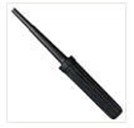
Probe Adjust
Options:
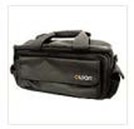
Soft Bag
General Care
Do not store or leave the instrument where the liquid crystal display will be exposed to direct sunlight for long periods of time.
Caution: To avoid any damage to the instrument or probe, do not exposed it to any sprays, liquids, or solvents.
Cleaning
Inspect the instrument and probes as often as operating conditions require. To clean the instrument exterior, perform the following steps:
9.Appendix
 Warning: Before power on again for operation, it is required to confirm that
the instrument has already been dried completely, avoiding any electrical short circuit or bodily injury resulting form the moisture.

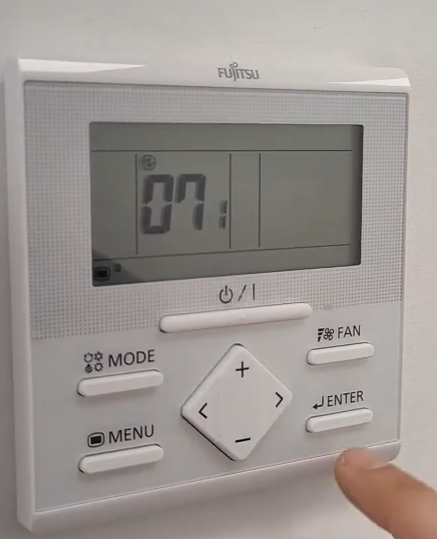 |
La funció 07-1 és la que activa el sensor de temperatura de la estància on és el termòstat i es regulen les unitats.
Polsar simultàniament durant uns segons: menú < enter ;Amb > arribar a
7 enter amb + posar 07.1
FNIRSl-10140 is a two in one oscilloscope and signal generator launched by FNIRSI, with comprehensive functions and high practiccibility. It is a cost-effective dual channel desktop oscilloscope for the maintenance industry and R&D industry. The oscilloscope has a real-time sampling rate of 1 GSa / s (giga samples), 100MHz* 2 analog bandwidth; complete trigger function (single time / normal / automatic), both for periodic analog signal and aperiodic digital signal can be used freely; built in DDS function signal generator and the industry’s original chopping output (@ 2.5VPP), all signal frequency step is 1Hz. support 14 kinds of standard function signal and a customizable chopping signal, chopping the output device intercepts part or the whole part of the complex signals measured by the oscilloscope as the output signal of the signal generator, which can store up to 1000 customized cut-off signals; the built-in high-voltage protection module can tolerate up to 400 continuous voltage, without worrying about the oscilloscope booming accident caused by the probe not moving to 10x gear. Large time base scrolling mode, which can monitor the slow level change; equipped with efficient one button auto, seIf-adaptive 25%, 50%, 75% trigger, which can display the measured waveform without complicated adjustment; the display is equipped with 7-inch 800 * 480 resolution high-definition LC screen; cursor measurement function, which can read the amplitude and frequency parameters manually without reading the background scale unit and quantity, and without conversion To get the peak and frequency directly; extremely convenient screen capture and waveform storage function, built-in 1GB storage space, cim store up to 1000 screen capture pictures + 1000 groups of waveform data, the storage process is simple and fast, save the current waveform, just a click to save the current data, very convenient; powerful waveform image manager, support thumbnail browsing, view, view details The functions of page turning, deleting and waveform enlarging, reducing and moving are convenient for secondary analysis. The fu is equipped with USB interface, which can be connected with the computer to realize the sharing of its own screen capture pictures and the computer, which is convenient for secondary analysis; Lissajous graphic display function can be used to compare and judge the amplitude, frequency and phase of two groups of signals; FFT viewing function can roughly estimate the harmonic component of the signal; Lissajous graphic display function can be used to compare and judge the amplitude, frequency and phase of two groups of signals
!
1: When the two channels are used at the same time, the ground clamps of the two probes must be connected. It is strictly forbidden to connect the ground clamps of the two probes to different potentials, especially the different potential terminals of high-power equipment or 220 v. otherwise, the oscilloscope mother board will be bumped. Because the two channels are grounded together, connecting to different potentials will lead to the short circuit of the internal ground wire of the motherboard, and all oscilloscopes are same;
2: The BNC input of oscilloscope can withstand 400 voltage at most. It is strictly forbidden to input more than 400 voltage in the position of 1x probe
3: The original power supply must be used It is strictly forbidden to use the power supply or USB of other devices under the Otherwise, the motherboard ground wire may be short circuited during the test
4: 100 x
probe (such as ultrasonic welding machine, ultrasonic cleaning Machine etc.) or even 1000x probe (such as high-voltage end of high-frequency transformer, coil of induction cooker, etc.) must be used to measure high-frequency and high-voltage signal.
Solemnly remind
the bandwidth of 1x probe is 5MHz, and the bandwidth of 10x probe is 100MHz.
When the measurement frequency is higher than 5MHz, the switch on the probe handle needs to be moved to 10x, and the oscilloscope also needs to be set to 10x.
Otherwise, the signal will be greatly attenuated, which is the case with all oscilloscopes.
Because the probe line of the oscilloscope itself has a capacitance as high as 100 – 300pf, which is a big capacitance for high frequency signal! The signal has been greatly attenuated when it reaches the input end of the oscilloscope through the probe, and the equivalent bandwidth is 5 MHz. Therefore, in order to match the hundreds of PF of the probe line, the input end of the probe line will be attenuated 10 times (the switch is in the 10x gear), so that the hundreds of PF capacitor is just used for impedance matching. At this time, the bandwidth is 100MHz. Note that only
probes with 100MHz bandwidth or above can be used
Interface function indicator diagram
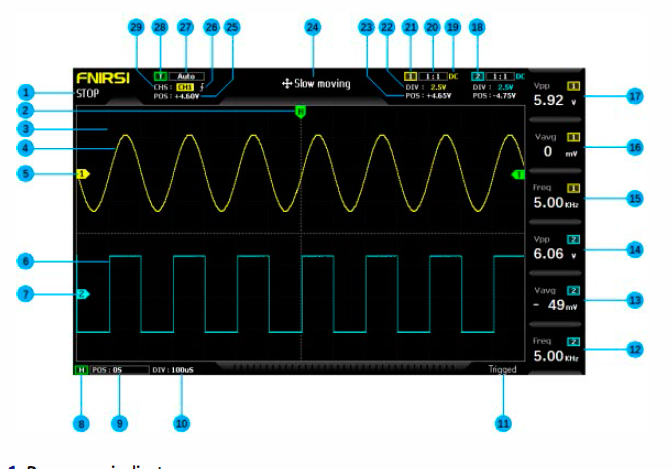
1: Run pause indicator
2: The trigger x position indication arrow indicates that this is the trigger x point
3: Background grid tick marks
4: Waveform data of channel 1
5: The baseline position of channel 1 indicates the arrow, that is, the position of OV potential
6: Waveform data of channel 2
7: The baseline position of channel 2 indicates the arrow, that is, the position of 0V potential
8: Horizontal time base control bar flag
9: Trigger the position of the X arrow relative to the system coordinate system
10: Horizontal time base refers to the length of time represented by a large grid in the horizontal direction, which is determined by the sampling rate. The larger the time base is, the slower the sampling rate is, and vice versa
11: Trigger status flag
12: Column 6 measurement parameters, press F6 to select measurement parameters freely
13: Column 5 measurement parameters, press FS to select measurement parameters freely
14: Column 4 measurement parameters, press F4 to select measurement parameters freely
15: Column 3 measurement parameters, press F3 to select measurement parameters freely
16: Column 2 measurement parameters, press F2 to select measurement parameters freely
17: Column 1 measurement parameters, press F1 to select measurement parameters freely
18: Channel 2 control bar sign
19: The input coupling mode of channel 1 has two options: DC and ac. DC means DC coupling and AC means AC coupling
20: Channel 1 probe magnification
21: Channel 1 control bar sign
22: vertical sensitivity of channel 1 refers to the voltage represented by a large grid in the vertical direction
23: Channel 1 baseline arrow position relative to the system coordinate system
24: movement speed of waveform operation, fast movement is used for coarse adjustment, and slow movement is used for fine adjustment
25: trigger voltage arrow position relative to the system coordinate system
26: trigger edge indicator, arrow up to rising edge trigger, arrow down to falling edge trigger
27: trigger mode indicator, divided into auto, single and normal; auto is automatic trigger, single is single trigger and normal is normal trigger
28: trigger control bar flag
29: trigger channel, divided into ch1 and CH2 options
Button function indication diagram
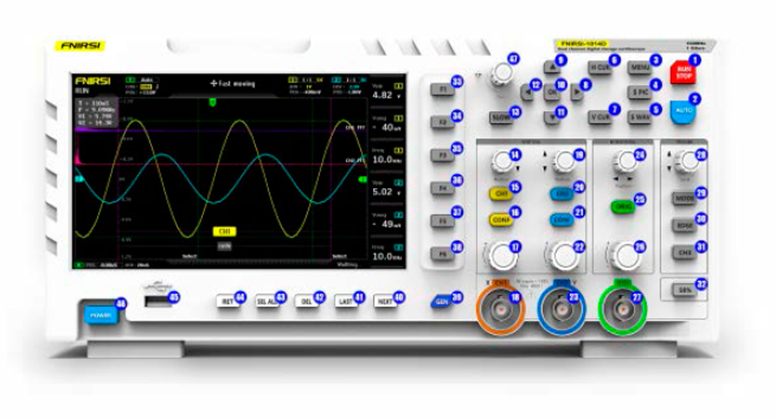
l pause button. Click. this button to pause sampling at any time
2: One key automatic adjustment button, click. this button, the system will automatically
identify the signal and set the system to the best parameters to display this waveform
3: Function menu button, click. hereto pop up the function menu
4: One click. screen capture button. Click. this button to take a screen capture of the
whole screen and save it to the interna! storage space automatically
5: One button save waveform button, click. this button will save all waveform data of
the two channels to the interna! storage space
6: Time cursor switch button, click. this button to turn on and off the cursor measurement
function
7: Press the voltage cursor switch keyto turn on and off the cursor measurement
function
8: System [right] navigation key
9: System navigation key
1 O: System [OK] navigation key
11: System navigation key
12: System [left] navigation key
13: Move speed button. Click. this button to switch between fast move and slow move
14: Channel 1 vertical position adjustment knob, rotate clockwise to move up, rotate
counterclockwise to move down
15: Channel 1 switch button. Click. this button to turn on or off the waveform display
of channel 1
16: Channel 1 control bar button. Click this button to pop up the control parameters
related to channel 1, which can be selected according to the navigation key or the
knob next to it
17: Channel 1 vertical sensitivity adjustment knob, clockwise vertical amplification,
counterclockwise vertical reduction
18: Channel 1 signal input port, the measurement range is O – 40V peak. to peak., pay
attention to the maximum tolerance of 400V peak. to peak. withstand voltage
19: Channel 2 vertical position adjustment knob, rotate clockwise to move up, rotate
counterclockwise to move down
20: Channel 2 switch button. Click this button to turn on or off the waveform display
of channel 2
21: Channel 2 control bar button. Click. this button to pop up the control parameters
related to channel 2, which can be selected according to the navigation key or the
knob next to it
22: Channel 2 vertical sensitivity adjustment knob, clockwise vertical amplification,
counterclockwise vertical reduction
23: Channel 2 signal input port. the measurement range is O – 40V peak. to peak., pay
attention to the maximum tolerance of 400V peak to peak withstand voltage
24: the system triggers the x position adjustment knob to move clockwise to the rig ht
and counterclockwise to the left
ZS: one key return to center button, after clicking this button, channel 1, channel 2
vertical position, trigger x horizontal position, trigger y vertical position will return to
center
Z6: the time base adjustment knob is rotated clockwise to reduce the time base, that
is, to enlarge the waveform horizontally, and counterclockwise to increase the time
base, that is, to reduce the waveform horizontally
Z7: DOS signal generator output
ZB: trigger voltage y position adjustment knob, rotate clockwise to move up, rotate
counterclockwise to move down
Z9: trigger mode switch button, divided into auto, single and normal
30: trigger edge switch button, divided into rising edge and falling edge
31: trigger channel switch button, divided into channel 1 and channel 2
32: 50% trigger button, click this button, the system will automatically set the current
trigger voltage to 25%, 50%, 75% according to the signal characteristics to trigger
33: the first column measurement parameter selection button, after the measurement
block diagram pops up, you can select according to the navigation key or the knob
next to it
34: the second column measurement parameter selection button, after the measurement
block diagram pops up, you can select according to the navigation key or the
knob next to it
35: the measurement parameter selection button in column 3, after the measurement
block diagram pops up, you can select according to the navigation key or the knob
next to it
36: the measurement parameter selection button in column 4, after the measurement
block diagram pops up, you can select according to the navigation key or the knob
beside it37: the measurement parameter selection button in column 5 pops up the
measurement block diagram, which can be selected according to the navigation key
or the knob beside it
38: the measurement parameter selection button in column 6, after the measurement
block diagram pops up, you can select according to the navigation key or the knob
beside it
39: signal generator control bar button, click this button will pop up the signal
generator parameter control bar, you can select according to the navigation key or
the knob next to it
40: next page of the control button on the next page of picture / waveform /
chopping Manager
41: picture l wave form l chopped wave manager next page control button [previous
page]
42: [delete] of the control button on the next page of picture l waveform l chopping
Manager
43: select a 11 of the control buttons on the next page of picture l waveform l chopping
Manager
44: [retum] of the control button on the next page of picture l waveform chopping
Manager
45: USB port for sharing screenshots
46: power switch, click to start or shut down operation
Operating instructions [oscilloscope part]
Open or close channel 1 / Channel 2:
click [ch1] / [CH2] to open or dose ch1 l CH2
Tum FFT on or off: click the [conf] button under ch1 or CH2, the parameter control bar
of channel 1 / Channel 2 will pop up, and then turn FFT on / off through the navigation
key
Setting input coupling mode:
click [conf] under ch1 or CH2 to pop up the parameter
control bar of channel 1 l Channel 2, and then switch DC l AC trough the navigation
key
Set the probe input ratio:
click [conf] under ch1 or CH2, the parameter control bar
of channel 1 l Channel 2 will pop up, and then switch to 1 x l 1 Ox / 1 OOx through the
navigation key
Scaling waveform: rotate the large knob at the bottom left corner of vertical frame
to scale the waveform of channel 1 vertically, and rotate the large knob at the bottom
right corner to scale the waveform of channel 2 vertically; rotate the large knob at the
bottom of horizontal frame to scale the waveform of channel 1 and channel 2
horizontally, clockwise to enlarge, counterclockwise to reduce
Moving waveform:
rotate the small knob in the upper left corner of vertical frame to
move the waveform of channel 1 vertically, and rotate the small knob in the upper
right corner to move the waveform of channel 2 vertically, which moves clockwise
upward and counterclockwise downward; rotate the small knob in the upper horizontal
frame to move the waveform of channel 1 and channel 2 horizontally, which moves
clockwise to the right and anticlockwise to the left In the process, you can click the
[slow] button to select coarse adjustment or fine adjustment
Adjust trigger voltage:
rotate the small knob under the trigger frame to adjust the
trigger voIta ge. In this process, you can click the [slow] button to select coarse adjustment
or fine adjustment. Pay attention to tum off the [automatic 50%] trigger in the
men u fi rst, otherwise the trigger voltage can not be adjusted
Set trigger edge:
click edge to switch rising edge l falling edge
Set auto trigger:
click mode to switch between auto l single l normal, where auto is
auto trigger
Set single trigger:
click mode to switch between auto l single l normal, where single
is single trigger
Set normal trigger: click mode to switch between auto l single l normal, where
normal is normal trigger
Pause display:
click the red [run l stop] button in the upper right corner to pause or
run
Automatic waveform adjustment: click the blue [auto] button in the upper right
corner to adjust automatically
Set the slow scan scrolling mode: rotate the big knob under the horizontal frame
counterclockwise. When the base reaches 1 OOms, the system will enter the slow scan
scrolling mode. 1 OOms – 50s belong to the time base of the scrolling mode
Time cursor measurement
click the [H cur] button to turn on the time cursor, and
then select the left and right light markings by the left and right keys of the navigation
key, and finally adjust them by the small knob in the upper left corner of the navigation
key, in which the light markings are moved to the right by clockwise rotation and
to the left by counterclockwise rotation
Voltage cursor measurement
click the [v cur] button to tum on the voltage cursor,
and then select the up and down light marking lines by the up and down keys of the
navigation key, and finally adjust them by the small knob in the upper left corner of
the navigation key, in which the light marking lines are moved upward by clockwise
rotation and downward by counterclockwise rotation
Set the parameters to be displayed:
click F1 – F6 to pop up the parameter measurement
control bar, and select the currently required parameters through the navigation
key or the nearby knob
Full screen capture:
click the [s pic] button to capture the current display. The
captured image is saved to the local disk in BMP format
s.va current waveform data: click the [s wav] button to save all waveform data of
the opened channel to the local disk
Adjust the screen brightness:
click the [menu] button, navigate to the [screen
brightness], press the OK key, and finally adjust the screen brightness through the
small knob in the upper left corner. 100 is the brightest and O is the darkest
Adjust the background grid brightness:
click the [menu] key, navigate to the [grid
brightness], press the OK key, and finally ad just t he grid brightness through the smal l
knob in the upper left corner. 100 is the brightest, and O is to turn off the grid display
Setting automatic 50% trigger all the time: click the [menu] key, navigate to
[automatic 50%], press the OK key, and then select [on] through the navigation key.
After setting, in the automatic trigger mode, each measurement system will automatically
set the trigger voltage to 25% / 50% / 75% of the peak to pea k value according
to the waveform characteristics
Horizontal baseline offset calibration:
when the probe has been pulled out, when
the left yellow l cyan indicator arrow and the Yellow l cyan horizontal baseline of
either channel are not in the same position, calibration is required; first pull out the
probe, then click the [menu] key, navigate to [baseline calibration], and then press the
OK key to calibrate the baseline
View the saved screen capture:
click [menu], navigate to [picture browse], and then
press the OK key to enter the picture thumbnail preview interface, which is the
thumbnail of the captured waveform. Select the thumbnail through the navigation
key, and then click [OKJ to view the screen capture of the waveform in full screen, with
(RET) return at the bottom, (SEL) All), (DEL), Oast), (next) the next control button can
be operated
View the saved waveform data:
click [menu] key, navigate to [waveform browse].
and then press the OK key to enter the waveform thumbnail preview interface, where
is the waveform thumbnail. Select the thumbnail through the navigation key, and
then click [OK] to view the waveform in full screen, with (REn retum at the bottom,
(SEL) All), (DEL), (last), (next) the next control button can be operated
Delete the saved waveform:
click the [menu] key, navigate to [waveform browse],
and then press the OK key to enter the waveform thumbnail preview interface, where
is the waveform thumbnail. Select the thumbnail through the navigation key, and
then click the [del] key at the bottom to delete the waveform, or click the key to delete
it in full screen view
Connect the computer to view the screen capture pictures:
click the [menu] button,
n¡¡vigate to the [USB share] through the navigation key, and then press the OK key to
open the USB share. Then connect the computer with the attached USB cable, and the
computer will pop up the removable disk or U-disk. Vau can find the screen capture
pictures saved in the disk in the computer. Note that you can’t repair them directly in
the disk Change the file name of the picture, otherwise the oscilloscope picture
manager will not be able to display the Picture
Operation instruction [signal generator part]
Switch the waveform type:
click the [Gen] button, the signal generator control
interface will pop up in the lower right corner of the screen, and then click the [OK]
button to switch the green selection box to the [waveform type] position, and then
click the [up] or [down] in the navigation key or the button in the upper left corner of
the navigation key to switch the waveform type
Adjust the waveform frequency:
click the [Gen] button, the sign¡il generator control
interface will pop up in the lower right corner of the screen, and then click the [OK]
button to switch the green selection box to the [frequency] position, and then click
the [left] or [right] in the navigation key to set the position cursor, that is, to set the
division to be adjusted. After confirming, press the [up] or [down] or the [up] button
in the upper left corner of the navigation key The knob can increase or decrease the
val u e of the current bit, thus changing the frequency
Adjust the duty cycle of square wave:
the duty cycle setting is only effective for
square wave. It can only be set when the waveform type is square wave. Other
waveforms h¡ive no concept of duty cycle. Click the [Gen] button, the signal generator
control interface will pop up in the lower right corner of the screen, and then click the
[OK] button to switch the green selection box to the [duty cycle] position, and then
rotate the navigation key in the upper left corner Vau can increase or decrease the
duty cycle with the knob of 1 % – 99%
Capture waveform:
Capture waveform output is to capture part or the whole part of
the current displayed waveform as the output of signal generator. The captured signa l
can be saved to the system, and up to 1000 groups of captured signals can be saved.
First. click the [menu] button, the function interface will pop up on the left side of the
screen, and then locate it to the capture output] position through the navigation key
and open it on the screen Two purple boundary lines will pop up. The waveform
within the two boundary lines is the waveform segment to be captured .The word
select indicates that the boundary line is the boundary line operated by the current
knob. You can switch and select the current operation line through the [left] and
[right] keys of the navigation key. After setting the boundilry line, you can go up to
the left through the navigation key When adjusting, you can click the [slow] key to set
coarse and fine adjustment; there is a word ‘channel 1 l Channel 2’ in the middle of
the two boundary lines, which means that the current captured signal is channel 1 l
Channel 2 signal, and you can select the channel through the [up] [down] of the
navigation key; the left boundary line is marked with voltage scale, which is used to
refer to the captured wave If you want to adjust the chopping level position, you can
adjust the offset by adjusting the Y position of the channel. For example, if you
captured a DC signal and adjust the DC waveform to+ 1V position, then the output
is + 1V voltage, and adjust to – 1V, then the output is – 1V voltage; If you want to
ildjust the sa m pi i ng ¡¡m plitude of chopped wave, you can adjust the verticil l sensitivity
of the channel to scale the waveform vertically. It is recommended to first amplify the
signal amplitude to the maximum, but not to cut the top, and then capture so that the
output signal will have enough sampling data, the output waveform distortion will be
smaller. and the resolution will be higher. If you only capture a very small signal, and
then capture it Output, and then through the oscilloscope meilsurement to enlarge it,
the waveform will appear a very serious ladder phenomenon, because the sampling
is insufficient, the effective signal is too little, just like the original image is very small,
but fon::ed to enlarge, the image is bound to be fuzzy; after all the parameters are
determined, click the [OKJ key, the cut-off will be saved to the system disk
Output the captured waveform as the signal generator:
first click the [Gen] button
to open the signa l generator interface, then click the [OK] button to switch the green
selection box to the [waveform type] position, and then click the [up] and [down] in
the navigation key to switch it to ‘self definition’, then click the [Gen] button to exit
the signal generator control interface, and then click the [ M ENU] button , the function
interface will pop up on the left side of the screen, and then navigate it to the [output
browsing] position and open it All saved captured signals will be listed on the screen,
and then the selection box will be moved to the desired signal position through the
navigation key. Click the [OKJ key, and the Yellow word ‘output’ will pop up in the
upper left corner of the w¡¡veform, which means that the current custom sign¡¡I
selection bit of the waveform Then click [menu] to exit, and the waveform output by
the signal generator is the captured signal. It should be noted that if the captured
waveform is a single cycle waveform, that is, there is only one cycle in the two bound
ary lines, then the output frequency of the signal generator is equal to the frequency
set by the signal generator. If the captured waveform frequency contains N cycles,
then the output frequency of the signal generator is n times of the set frequency, and
the trigger voltage should be adjusted to the minimum edge of the waveform In
other words, the intersection paint between the waveform and the trigger line is the
least:. otherwise the displayed frequency may be several times of the actual frequency,
because the calculated frequency of the oscilloscope is the frequency obtilined by
calculating the number of edges from the trigger line, so the wrong edge of the
positioning may also lead to frequency doubling
Analysis of common problems
1: Why can’t I turn on the machine after receiving it?
Answer: please check whether the power cord is connected to the oscilloscope and
whether the socket is powered. If all are correct. please replace a mobile phone
charging head and test it. If it is still unable to start. please contact customer service for replacement
2: Why Is there no waveform In the test, only one line on the screen Is still?
Answer: please check whether the pause has been pressed. If not. press the [auto]
button once. If not. it may be a problem that the signal source has no signal output.
or the probe line may be short circuited or open circuit. Please check whether the
probe and signal source are normal with multimeter
3: Why is the voltage value data 0?
Answer: please adjust the vertical sensitivity and time base (sampling rate), or press
[auto] screen to display at least a clear and complete periodic waveform, and the top
and bottom of the waveform should be displayed on the screen completely without
cutting the top. The voltage value data is correct at this time
4: Why is the frequency value data 0?
Answer: first. it is necessary to ensure that the trigger mode is auto automatic triggering.
if it is still O in auto mode, press [auto] button once. At least a clear and complete
periodic waveform is displayed on the screen, and the waveform should be triggered
(the green arrow indicates that the position is fixed between the wave shape and the
wave shape without shaking). The data of frequency value is correct
5: Why is the duty cycle 0?
Answer: first. it is necessary to ensure that the trigger mode is auto automatic triggering.
If it is still O in auto mode, it may be that the trigger is not adjusted to the
waveform. After the trigger line is adjusted to the waveform, the waveform will be
fixed. Moreover, the data of duty cycle will be correct only after at least one clear
periodic waveform is displayed on the screen
6: Why is AC coupling the same as DC coupling waveform?
Answer: if the input signal is a symmetrical AC signal (such as domestic 220V}, the AC
coupling or DC coupling waveform are the same. If it is an asymmetric AC signal or a
DC pulse signal, the waveform will move up and down when the coupling is switched
7: Why does the wavefonn run up and down when testing the signal, and can’t
see the wavefonn only see multiple online and offline beats?
Answer: set trigger mode to auto auto trigger, and then press [auto] button once. If it
is not solved, the clamp on the probe may not be grounded or the probe clamp end
is open circuit. Please check whether the probe is normal with multimeter
8: Why does the test wavefonn shake around and cannot be futed?
Answer: the trig g e r voltage needs to be adjusted, this is, the green arrow on the right
needs to adjust the green indicator to the top and bottom of the waveform. The
waveform is triggered and fixed, or the setting menu is entered to turn on «automatic
50%.’
9: Why can’t we capture sudden pulse waves or digital logic signals?
Answer: adjust the trigger mode to ‘Normal» or «Single’, then adjust the trigger
voltage and time base and vertical sensitivity, and finally touch the pause.
1 O: Why does trigger voltage regulation not respond?
Answer: click menu – Auto 50% to dose it
11: Why do you measure a battery or other DC voltage with out waveform?
Answer: battery voltage signal is stable DC signal, there is no curve waveform, in DC
coupled mode, and then adjust vertical sensitivity, there will be an upward or
downward offset straight line waveform, if it is AC coupling, no matter how to adjust.
there is no waveform.
12: why do we measure the 220V power frequency 50Hz wave?
Answer: if the oscilloscope displays SOHz low frequency signal, the sampling rate
needs to be very low to capture SOHz signal. If the sampling r11te is low, the oscilloscope
will enter the waiting, so it will show «card change’. All oscilloscopes in the
world will change their cards when measuring SOHz signals, not because the oscilloscope
itseIf is stuck
13: Why is the peak value of VPP more than 600 V and not 220V or 31 OV when
measuring the voltage wave form of the city power?
Answer: the city power 220V is a symmetrical AC signal, the positive peak voltage
(maximum value) is +310v, the negative peak voltage (minimum value) is -310v, sothe
peak value is 620V, the switching parameter is the effective value. At this time, it
is often said that the voltage of 220V, the effective value of the municipal voltage
fluctuates from 180 to 260V, so the peak VPP is in the range of 507-733v
14: Why is the measured voltage of 220V not a standard sine wave, there is
distortion?
Answer: in the municipal power grid, there are generally pollution, and there are more
high-order harmonic components. These harmonies will show a distorted sine wave
and normal phenomenon when superimposed on the sine wave. Generally, the shape
of the city electric wave is distorted, and it is irrelevant to the oscilloscope itself
15: Why is there a large offset between the baseline (OV) and the left arrow COV
indication} on the screen under no 5ignal input?
Answer: first pull out the probe, then click [menu] button, navigate to [baseline
calibration], then press OK, and wait for baseline calibration to complete, the baseline
and arrow coincide
16: Why is the signal voltage above 5MHz measured attenuated significantly, and
the bandwidth is only 5MHz?
Answer: when measuring 5MHz or more, it is necessary to move the probe to 10x
gear and the oscilloscope should be set to 1 Ox input mode, because the probe line of
the oscilloscope has a capacitance of up to 100-300pf, which is a big capacitance for
high frequency signal! The signal has been greatly attenuated when it reaches the
input end of the oscilloscope through the probe, and the equivalent bandwidth is
SMHz. So in order to match hundreds of PF of probe line, it will be decayed 1 O times
at the input end of probe line (switch is in 10x), so that these hundreds of PF capacitors
are just used for impedance matching. At this time, the bandwidth is 100MHz.
Note that only the supporting 100 MHz probe can be used
Test methods of common circuits
Battery or DC voltage measurement
Gear selection: the battery voltage is generally below 40V, other DC voltage is
uncertain, so it is necessary to adjust the gear according to the actual situation. if it
is higher than 40V (both probe and oscilloscope are set to the same gear)
1: Firstly, the oscilloscope is set to auto trigger mode (auto trigger mode is default
after startup), and auto trigger mode is used to test the cycle signal (DC voltage
belongs to the periodic signal)
2: The oscilloscope probe multiplier is set to the corresponding gear (default is 1x
after startup)
3: Oscilloscope coupling mode is set to DC coupling mode
4: Insert the probe and move the switch on the probe handle to the corresponding
gear
5: Make sure the battery is powered or the DC voltage is voltage output
6: Connect the probe clip to the negative battery or the negative DC electrode, and
the probe to the battery or DC positive pole
7: Press [auto] once, the DC electrical signal will be displayed. Then, look at the
parameter of average value. Note that battery voltage or other DC voltage belong to
DC signal, and there is no curve waveform, only a line with up and down offset and
the peak value and frequency of this signal are O
Crystal vibration measurement
Gear selection: crystal oscillator is easy to stop oscillation after encountering capacitance.
input capacitance of 1x probe is up to 100-300pf, 10x gear is about 10-30pf,
and it is easy to stop vibration in 1x gear, so it is necessary to set 1 Ox gear, that is, both
probe and oscilloscope should be switched to 10x gear (probe and oscilloscope are
set to 10x gear)
1: Firstly, the oscilloscope is set to auto trigger mode (auto trigger mode is default
after startup), and auto trigger mode is used to test the periodic signal (the sine signa l
of crystal resonance belongs to the periodic signal
2: The oscilloscope probe multiplier is set to 10x (default is in the 1x gear after
startup)
3: Oscilloscope coupling mode is set to AC coupling mode
4: insert the probe and move the switch on the probe handle to 10x
5: Make sure the crystal board is powered on and running
6: Connect the probe clip to the ground wire of the crystal oscillator board (negative
pole of power supply), pull the probe cap out, and inside it is the needle tip, which
contacts one of the pins of the crystal oscillator
7: Press the [auto] button once to display the waveform of the crystal vibration tested.
If the waveform after automatic adjustment is too small or too large, the waveform
size can be adjusted manually by knob
PWM signal measurement of MOS tube or IGBT
Gear selection: the PWM signal voltage of direct drive MOS tube or IGBT is generally
within 10v-20v, the control signal of PWM front stage is also generally within 3-20v,
and the maximum test of 40V in the 1x gear is enough. Therefore, it is enough to
test the PWM signal with the 1x gear (both probe and oscilloscope are set to the 1x
gear).
1: Firstly, the oscilloscope is set to auto trigger mode (auto trigger mode is default
after startup), and auto trigger mode is used to test cycle signal (PWM belongs to
cycle signal
2: The oscilloscope probe multiplier is set to the 1x gear (default is 1x gear after
startup)
3: Oscilloscope coupling mode is set to DC coupling mode
4: insert the probe and move the switch on the probe handle to the 1x position
5: Make sure that the PWM main board has PWM signal output at this time
6: Clip the probe to the S-pole of the MOS tube and the probe to the g-pole of the
MOS tube
7: Press the [auto] button once to display the measured PWM waveform. if the
waveform after automatic adjustment is too small or too large, the waveform size can
be adjusted manually by knob
Signal generator output measurement
Gear selection: the output voltage of signal generator is within 30V, and the maximum
test value of 1x gear is 40V, so the output of test signal generator is in the 1x gear
(probe and oscilloscope are set to be 1 x gear).
1: Firstly, the oscilloscope is set to auto trigger mode (the default mode is auto trigger
mode after startup), and auto trigger mode is used to test the periodic signal (the
signal output by the signal generator belongs to the periodic signaO
2: The oscilloscope probe multiplier is set to the 1x gear (default is 1x gear after
startup)
3: Oscilloscope coupling mode is set to DC coupling mode
4: insert the probe and move the switch on the probe handle to the 1x position
5: Make sure the signal generator is on and is outputting the signal
6: Connect the probe clip to the black clip of the signal generator output line, and the
probe to the red output line of the signa l generator
7: Press the [auto] button once, the waveform output by the generator will be
displayed. If the waveform after automatic adjustment is too small or too large, the
waveform size can be adjusted manually by knob
Measurement of domestic electricity at 220V or 110V
Gear selection: first, you need to buy 1 OOx probe; household electric power generally
180-260V, peak peak voltage is 507-733v, the maximum measurement of 1x is 40V,
the highest val u e of 1 Ox is 400V, 1 OOx is 4000V, and the default standard probe is 1 Ox
high voltage probe, and the peak value of 400V can only be measured. Therefore,
1 OOx probe shall be provided by itseIf, and then set to 1 OOx gear, that is, both probe
and oscilloscope shall be switched to 1 OOx gear
1: Firstly, the oscilloscope is set to auto trigger mode (auto trigger mode is default
after startup), and auto trigger mode is used to test the cycle signal (50Hz of household
electric power belongs to the periodic signal)
2: The oscilloscope probe multiplier is set to 100x (default is in the 1x gear after
startup)
3: Oscilloscope coupling mode is set to AC coupling mode
4: insert the probe and move the switch on the probe handle to 100X
5: Ensure that the tested end has a home power output
6: Connect the probe clip and probe to 2 wires of household electric power without
distinguishing the positive and negative pales
7: Press the [auto] button once to display the waveform of the household electric
power. If the waveform after automatic adjustment is too small or too large, the
waveform size can be adjusted manually by the knob
Power ripple measurement
Gear selection: if the output voltage of power supply is below 40V, it is set to the 1x
gear (both probe and oscilloscope are set to 1x gear), and 10x gear (both probe and
oscilloscope are set to the same gear if they are 40-400v}
1: Firstly, the oscilloscope is set to auto trigger mode (auto trigger mode is default
after startup), and auto trigger mode is used to test the cycle signal (DC voltage
belongs to the periodic signal)
2: The oscilloscope probe multiplier is set to the corresponding gear (default is 1x
after startup)
3: The oscilloscope coupling mode is set to AC coupling mode, note that AC AC
coupling mode
4: Insert the probe and move the switch on the probe handle to the corresponding
gear
5: Make sure the power is powered on and voltage output is available
6: Connect the probe clip to the negative extreme of the power output, and the probe
is connected to the positive extreme of the power output, and wait for about 3
seconds. When the yellow line and the left yellow arrow position are in the same
position, wait until the position is in the same position
7: Press the [auto] button once, and the power ripple will be displayed
Inverter output measurement
Gear selection: the output voltage of inverter is similar to that of household electricity,
with peak voltage above 500V, the highest measurement of 40V in 1X, 400V in
1 Ox and 4000V in 1 OOx gear. The default standard probe is 1 Ox hi g h voltage probe,
and the peak value of 400V can only be measured at the highest. Therefore, 100x
probe shall be provided by itself, and then set to 1 OOx gear, that is, both probe and
oscilloscope shall be switched to 1 OOx gear
1: Firstly, the oscilloscope is set to auto trigger mode (the default mode is auto trigger
mode after startup), and auto trigger mode is used to test the periodic signal (the
signal output by the inverter belongs to the pericolic signal
2: The oscilloscope probe multiplier is set to 100x (default is in the 1x gear after
startup)
3: Oscilloscope coupling mode is set to DC coupling mode
4: Insert the probe and move the switch on the probe handle to 100X
5: Ensure inverter is powered on and voltage output is available
6: Connect the probe clamp and probe to the output end of the inverter without
distinguishing the positive and negative poles
7: Press the [auto] button once to display the waveform of the inverter. If the
waveform after automatic adjustment is too small or too large, the waveform size can
be adjusted manually by knob
Measurement of power amplifier or audio signal
Gear selection: the output voltage of power amplifier is generally below 40V, and the
maximum test of 40V in the 1x gear is enough {both probe and oscilloscope are set
to the 1 x gear).
1: First set the oscilloscope to auto trigger mode {the default is auto trig ge r mode
after startup)
2: The oscilloscope probe multiplier is set to the 1x gear (default is 1x gear after
startup)
3: Oscilloscope coupling mode is set to AC coupling mode
4: Insert the probe and move the switch on the probe handle to the 1x position
5: Ensure that the amplifier is on and is outputting audio signals
6: Connect the probe clip and probe to the output end of 2 lines of the amplifier
without distinguishing the positive and negative poles
7: Press the [auto] button once to display the waveform of the inverter. If the
waveform after automatic adjustment is too small or too large, the waveform size can
be adjusted manually by knob
Measurement of vehicle communication signal J bus signal
Gear selection: the communication signal of automobile is generally lower than 20V,
and the maximum test for 1x gear is 40V, so it is enough to test the vehicle communication
signal with the 1x gear (both probe and oscilloscope are set to the 1x
gear).
1: Firstly, the oscilloscope is set to normal trigger mode (auto trigger mode is
default after startup). Normal trigger mode is specially used to measure the non
periodic digital signal. If Auto trigger mode is used, it is impossible to grasp the non
periodic signal
2: The oscilloscope probe multiplier is set to the 1x gear (default is 1x after startup)
3: Oscilloscope coupling mode is set to AC coupling mode
4: Insert the probe and move the switch on the probe handle to the 1x position
5: Connect the probe clip and probe to two signal lines of communication line,
regardless of positive and negative. If there are multiple signal lines, you need to
judge the signal line in advance, or try to select two of them for testing several times
6: Make sure that there is a communication signal on the communication line at this
time
7: Adjust the vertical sensitivity to 50mV
8: Time base to 20us
9: Press [50%] once
10: When there is communication signal on the communication line, the oscilloscope
will capture and display it on the screen. if it can not be captured, it is necessary to try
to ad just the time base (1 ms-100ms) and trigger voyage {green arrow) for multiple
times
Infrared remote receiver measurement
Gear selection: the infrared remote control signal is generally 3-5v, and the maximum
test for 1x gear is 40V, so it is enough to test the vehicle communication signal signa l
with the 1x gear {both the probe and oscilloscope are set to the 1x gear).
1: Firstly, the oscilloscope is set to normal trigger mode {auto trigger mode is
default after startup). Normal trigger mode is specially used to measure the non
periodic digital signal. If the auto trigger mode is not able to grasp the non periodic
signal, the infrared remote control signal belongs to the non periodic digital coding
signal
2: The oscilloscope probe multiplier is set to the 1x gear (default is 1x after startup)
3: Oscilloscope coupling mode is set to DC coupling mode
4: Insert the probe and move the switch on the probe handle to the 1x position
5: Connect the probe clip to the ground end (negative) of the infrared receiver board,
and the probe to the data pin of the infrared receiver
6: Adjust the vertical sensitivity to 500mv
7: Time base to 20us
8: Tum the trigger red arrow position to the left yellow arrow position and approximately
1 large grid distance
9: At this time, the infrared receive hair signal is sent by remate control, and the
waveform will appear on the oscilloscope
Measurement of amplification circuit with sensors (temperature, humidity,
pressure, hall, etc.)
Gear selection: generally, the sensor signal is relatively weak, about a few millivolts.
This small signal cannot be detected directly by oscilloscope. There is signal amplification
part on the main board of this sensor. When the output end of the amplifier is
found, the oscilloscope can measure the signal after being enlarged. It can be used in
the 1x gear (both probe and oscilloscope are set to the 1x gear)
1: First set the oscilloscope to auto trigger mode (the default is auto trigger mode
after startup)
2: The oscilloscope probe multipliers is set to the 1x gear (default is 1x after startup)
3: Oscilloscope coupling mode is set to DC coupling mode
4: Insert the probe and move the switch on the probe handle to the 1x position
5: Connect the probe clip to the ground end of the sensor motherboard (negative
power supply), find the output end of the amplification part, and connect the probe
to the output end
6: Adjust the vertical sensitivity to 50 mV
7: Adjust the time base to 500ms and enter the slow scan mode of large time base
8: Move baseline to bottom
9: If the signal line appears at the top, the vertical sensitivity shall be reduced, which
is 100mV, 200mV, 500mv, etc. in turn, when the updated signal on the right starts not
at the top (generally the best in the middle of the upper and lower part), the signal
received by the sensor can be detected.
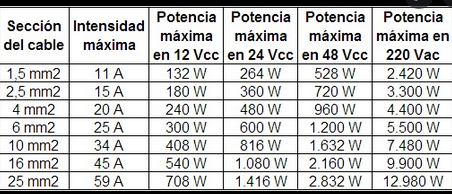
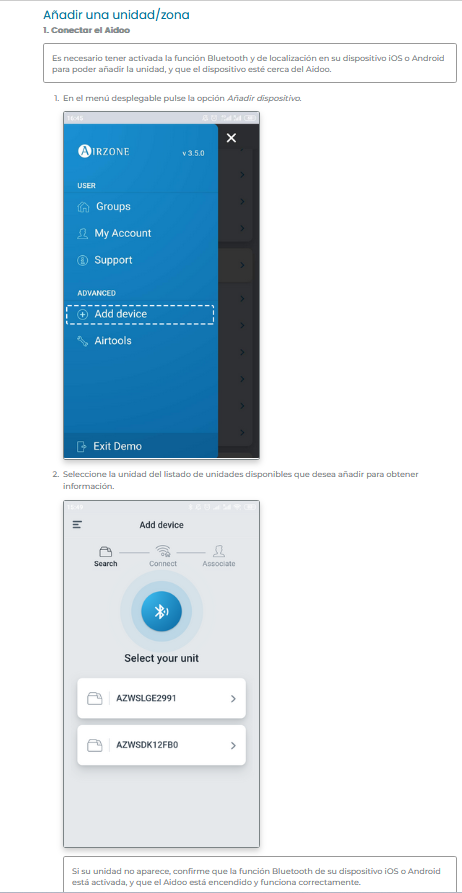
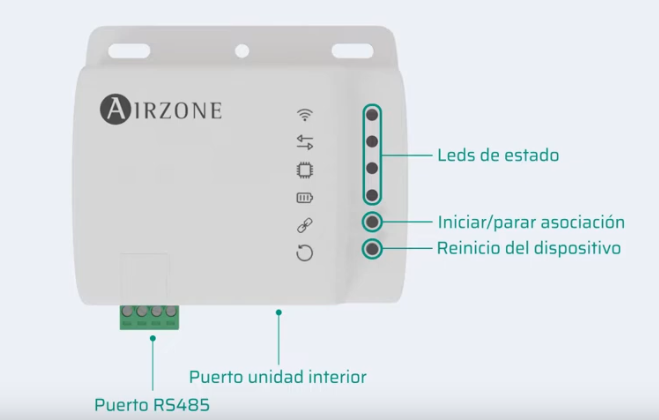
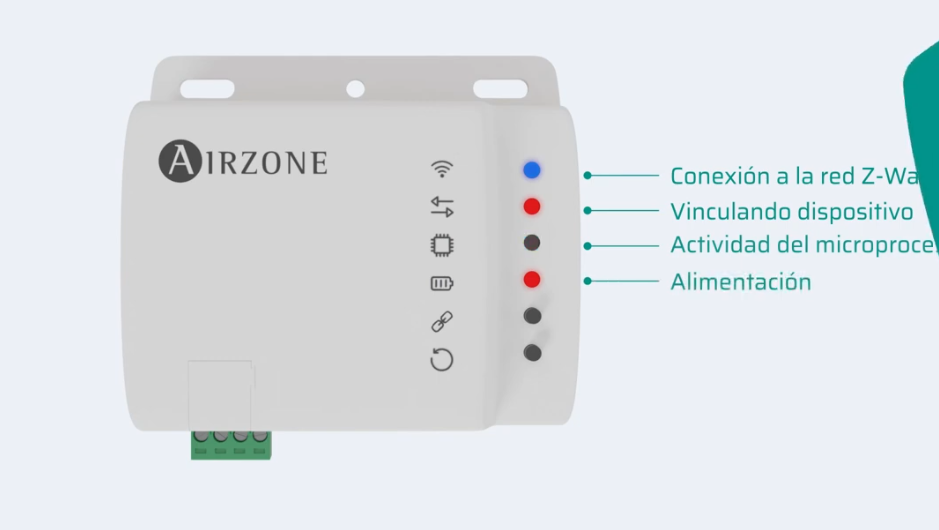
Entrar a Aidoo
Selecciona ajustos
Anar a urqtejmi


 , Delay A→B
 , Cycle