http://web.simmons.edu/~grabiner/comm244/weeknine/css-layouts.html#two_column_layouts
2-column-stretch.css
/*
This is basic CSS code for a website with a header, footer, and 2 columns
The sidebar is on the left.
The site is centered and the content is 960px wide, but the backgrounds stretch to fit the page
*/
/* Basic Reset */
* {margin:0; padding: 0;}
/* Basic Structure */
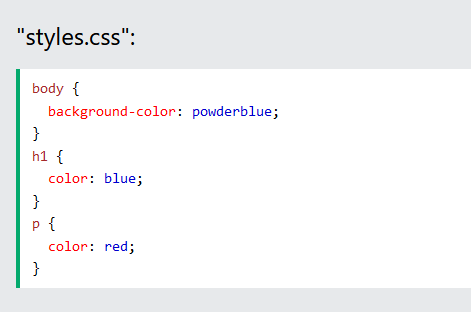
body {
text-align: center; /* This is a hack for older browsers to center the page */
}
.centerLayout {
/* We use a class for this since we’re using it in several places */
margin: 0 auto; /* This centers the page in modern browsers */
text-align: left; /* This is a hack for older browsers to center the page */
width: 960px; /* This sets our total page width */
}
#navigation li {
float: left; /* Floating also makes our navigation display in a line */
}
#content {
float: left; /* This causes the content to move to the left */
width: 700px; /* We need to set the width whenever we float an element */
}
#sidebar {
float: left; /* This causes the sidebar to move to the left */
width: 260px; /* We need to set the width whenever we float an element */
}
#footer {
clear: both; /* This makes sure that the footer clears both the sidebar and content floats */
}
/*
* For Demonstration Only
* This code is just for the purpose of the demonstration to hightlight things so that you can see them
*/
body {
background-color: #666;
color: white;
}
#header {
background-color: aqua;
height: 100px;
}
#navigation {
background-color: red;
line-height: 2;
overflow: auto; /* Elements that only contain “floated” content have no height.
In order to give then height and force them to wrap around their content,
we use overflow: auto
*/
}
#navigation li {
list-style: none;
width: 150px; /* This sets the width of our links to 150px wide */
}
#content {
background-color: #666;
}
#sidebar {
background-color: #999;
clear: left; /* We have to make sure that the sidebar clears the navigation, since we’ve floated it */
}
#footer {
background-color: black;
}
2_Column_Layout.html
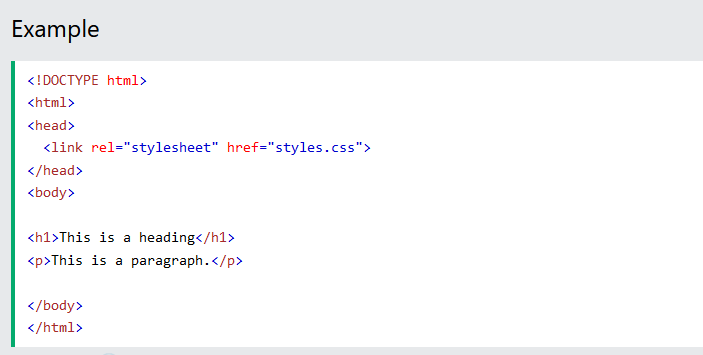
<!DOCTYPE html PUBLIC "-//W3C//DTD XHTML 1.0 Strict//EN" "http://www.w3.org/TR/xhtml1/DTD/xhtml1-strict.dtd">
<html xmlns="http://www.w3.org/1999/xhtml" xml:lang="ru">
<head>
<title>Basic 2 Column Layout that stretchs</title>
<meta http-equiv="Content-Type" content="text/html;charset=UTF-8"/>
<link rel="stylesheet" href="2-column-stretch.css" type="text/css" media="screen" charset="utf-8" />
</head>
<body>
<div id="header">
<div class="centerLayout">
<p>logo</p>
</div>
</div>
<div id="navigation">
<div class="centerLayout">
<ul>
<li>link 1</li>
<li>link 2</li>
<li>link 3</li>
</ul>
</div>
</div>
<div class="centerLayout">
<div id="sidebar">
<h2>Sidebar</h2>
<p>Lorem ipsum dolor sit amet, consectetur adipisicing elit, sed do eiusmod tempor incididunt ut labore et dolore magna aliqua. Ut enim ad minim veniam, quis nostrud exercitation ullamco laboris nisi ut aliquip ex ea commodo consequat. Duis aute irure dolor in reprehenderit in voluptate velit esse cillum dolore eu fugiat nulla pariatur. Excepteur sint occaecat cupidatat non proident, sunt in culpa qui officia deserunt mollit anim id est laborum.</p>
</div>
<div id="content">
<h1>Content</h1>
<p>Lorem ipsum dolor sit amet, consectetur adipisicing elit, sed do eiusmod tempor incididunt ut labore et dolore magna aliqua. Ut enim ad minim veniam, quis nostrud exercitation ullamco laboris nisi ut aliquip ex ea commodo consequat. Duis aute irure dolor in reprehenderit in voluptate velit esse cillum dolore eu fugiat nulla pariatur. Excepteur sint occaecat cupidatat non proident, sunt in culpa qui officia deserunt mollit anim id est laborum.</p>
<p>Lorem ipsum dolor sit amet, consectetur adipisicing elit, sed do eiusmod tempor incididunt ut labore et dolore magna aliqua. Ut enim ad minim veniam, quis nostrud exercitation ullamco laboris nisi ut aliquip ex ea commodo consequat. Duis aute irure dolor in reprehenderit in voluptate velit esse cillum dolore eu fugiat nulla pariatur. Excepteur sint occaecat cupidatat non proident, sunt in culpa qui officia deserunt mollit anim id est laborum.</p>
</div>
</div>
<div id="footer">
<div class="centerLayout">
<h3>Footer</h3>
<p>Lorem ipsum dolor sit amet, consectetur adipisicing elit, sed do eiusmod tempor incididunt ut labore et dolore magna aliqua. Ut enim ad minim veniam, quis nostrud exercitation ullamco laboris nisi ut aliquip ex ea commodo consequat. Duis aute irure dolor in reprehenderit in voluptate velit esse cillum dolore eu fugiat nulla pariatur. Excepteur sint occaecat cupidatat non proident, sunt in culpa qui officia deserunt mollit anim id est laborum.</p>
</div>
</div>
</div>
</body>
</html>

 Aquest mètode s'ulitza molt en word